Another Cursor 0-day Enabling Arbitrary Code Execution Beyond Git.exe
Maland | Sunday, August 16, 2026
TL;DR
AI security firm Mindgard recently disclosed a binary planting vulnerability in Cursor IDE where opening a repository on Windows can auto-execute a malicious git.exe planted at the repository root or workstation without no prompt injection, no agent, no model in the loop, and no prior access to the machine. They reported the issue to Cursor on 15 December 2025 and published the full technical details on 14 July 2026, approximately seven months later.
During the first quarter of 2026, I also identified the same git.exe execution behavior while conducting research for paper conference. However, my investigation revealed that this behavior actually was not limited to git.exe only. Under specific conditions, other attacker-controlled files could also be automatically executed when a developer opens a folder, without requiring any additional user interaction.
Basically, the underlying behavior exposed a broader zero-click execution surface beyond the previously disclosed or reported case.
This article walks through that behavior and focuses on what exists beyond git.exe, the other file we identified, and the conditions required to trigger its execution, how the execution works, and why this can still result in a zero-click execution scenario (open folder) from the developer’s perspective.
The Beginning
Mindgard explained the binary planting via git.exe vulnerability mechanism quite clearly.
When Cursor loads a project or workspace, it needs to locate git binary and run git-related operations like run introspection commands like git rev-parse --show-toplevel.
4:25:12.6209706 PM    Cursor.exe    54880    Process Create    c:\Users\aport\Documents\Audits\cursor\test_repos\git_exec0001\git.exe
SUCCESS    PID: 48972, Command line: git rev-parse --show-toplevel    "C:\Users\aport\AppData\Local\Programs\cursor\Cursor.exe"
C:\Users\aport\AppData\Local\Programs\cursor\Cursor.exe
Binary planting via git.exe
To find that binary, Cursor searches multiple locations including the workspace directory being opened. On Windows, the executable search order checks the current working directory before system paths by default.
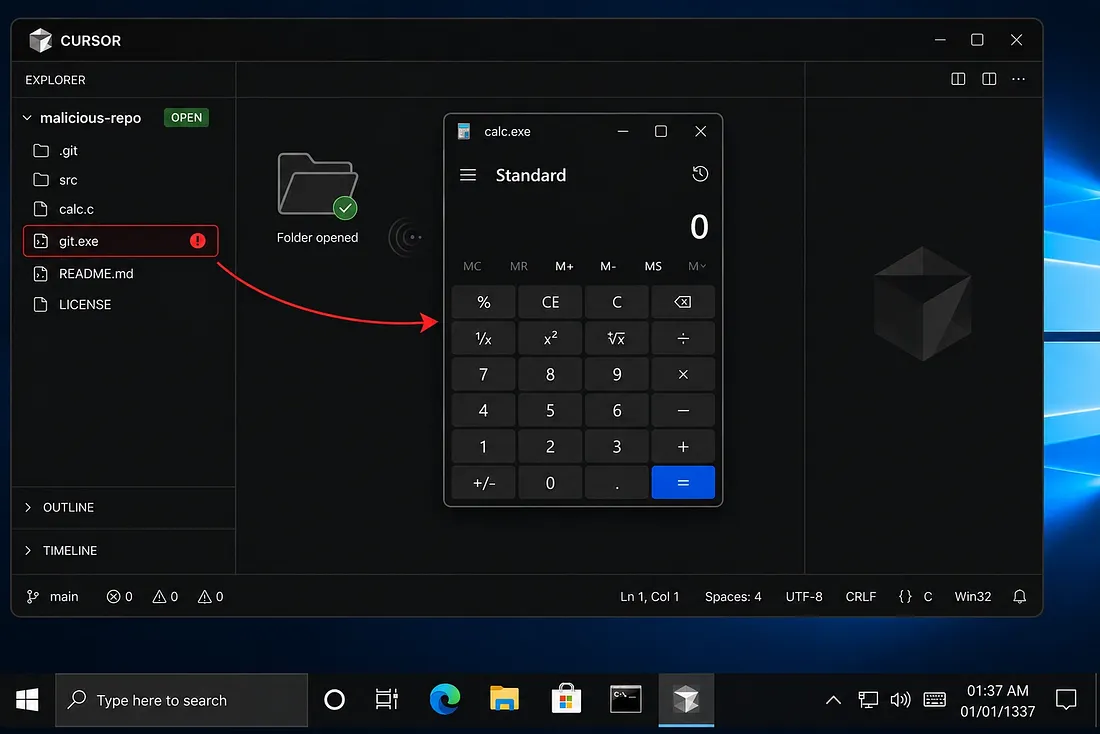
The repository contains:
project/
├── git.exe
├── src/
├── calc.c
├── LICENSE
├── README.md
If the legitimate file named git.exe is not found there and an attacker places a malicious git.exe in the workspace, Windows can execute the malicious file instead under the privileges of the current user.
Workspace Trust Limitation
During our research, we also looked at whether this behavior could be reproduced in other AI-assisted IDEs with Workspace Trust is turned on which may block execution when the folder is untrusted since that mechanism basically works like a security gate.
"security.workspace.trust.enabled": trueTo verify this assumption, we tested the same scenario on Trae IDE, which enables Workspace Trust by default.
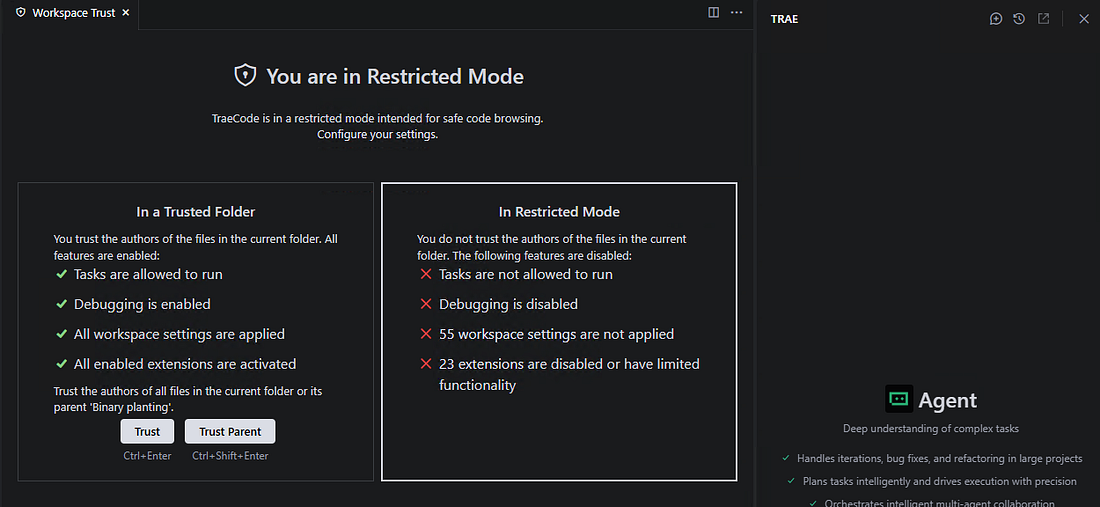
However, when we analyzed it, we also found Trae also attempts to locate git.exe inside the current workspace folder that opened. Trae repeatedly attempts to locate git.exe within the current untrusted folder through CreateFile operations, resulting in NAME NOT FOUND when the file does not exist.
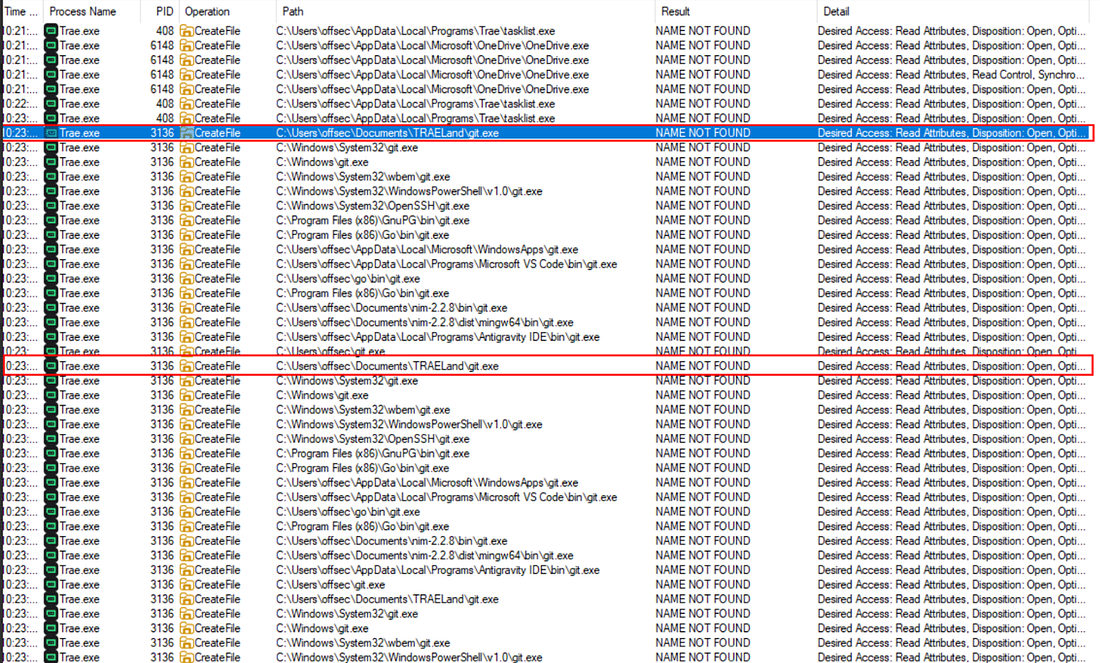
This indicates that enabling Workspace Trust does not necessarily prevent the IDE from interacting with attacker-controlled files inside an untrusted workspace. The trust mechanism may restrict certain workspace actions, but the underlying binary resolution behavior can still expose an execution path if a malicious binary is placed in a location searched by the IDE.
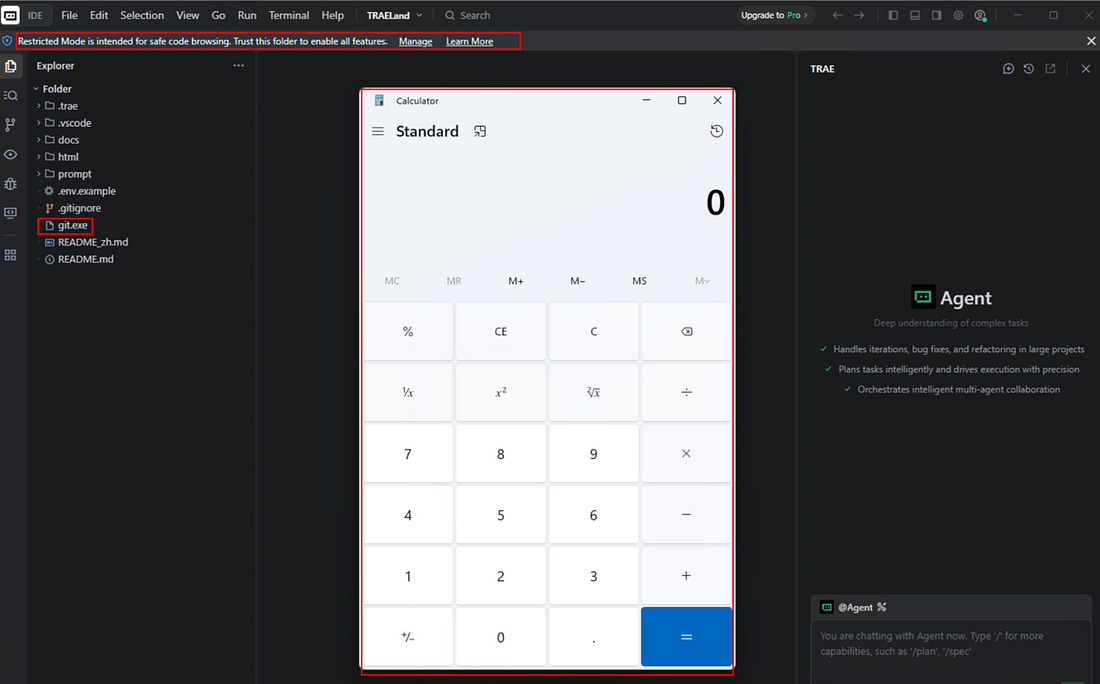
Under the same binary planting condition, if an attacker-controlled git.exe is present in the workspace, the binary could be resolved and executed when the user opens the folder under the privileges of the current user, resulting in the same impact as the previously discussed scenario.
No Patch During the Disclosure Period
During the seven months between Mindgard’s initial report (December 2025) and their public disclosure (July 2026), the vulnerability was not fixed at all. Cursor’s position was that the report was out of scope for its bug bounty program, citing a shared-responsibility model in which users are responsible for managing the repositories and other external content they introduce, rather than treating it as a vulnerability requiring a vendor-side fix.
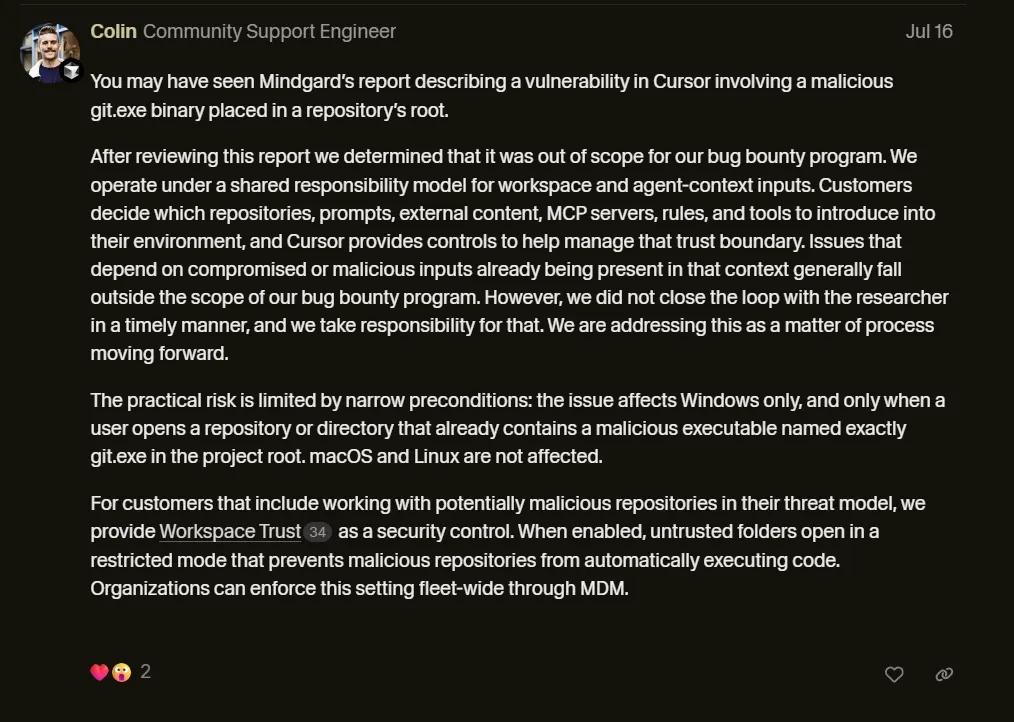
Separately, we also reported our observation regarding similar behavior in Trae through available vendor support channels, including email and community communication channels. However, no remediation or public response was provided during the disclosure period.
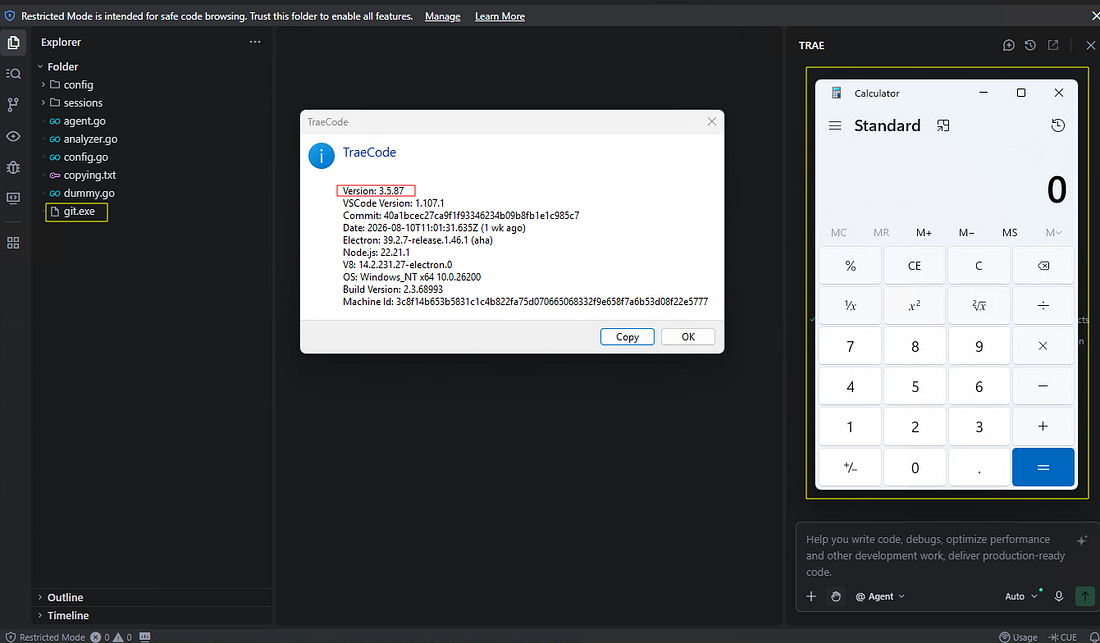
The latest version of Trae tested at the time of this article’s publication still showed the same behavior, and users or developers should be aware of this risk.
Defender Perspective
With no official patch from Cursor, most users and developers usually had to implement their own workarounds like checking repositories for suspicious binary file or monitor for suspicious process creation where Cursor.exe spawns git.exe from a non-standard location:
// KQL query for Microsoft Defender / Sentinel
DeviceProcessEvents
| where InitiatingProcessFileName =~ "Cursor.exe"
| where FileName =~ "git.exe"
| where FolderPath !has @"AppData\Local\Programs\Git"
| where FolderPath !has @"Program Files\Git"
| project Timestamp, DeviceName, InitiatingProcessCommandLine, FileName, FolderPath, SHA256
However, relying solely on git.exe as a filter or search criterion creates a blind spot. If other files can trigger the same behavior under different conditions, then monitoring only for git.exe is not enough to detect the broader execution surface or catch those other execution paths.
The fundamental security boundary is therefore not the executable filename itself. It is the transition from untrusted project content to executable code.
Cursor Quietly Patches The Bug
After approximately seven months of private disclosure, Cursor silently patched the git.exe execution vulnerability shortly before Mindgard’s public disclosure and subsequent coverage by security publications such as The Hacker News which brought greater attention to the issue and its potential impact on customer trust and the company’s security reputation.
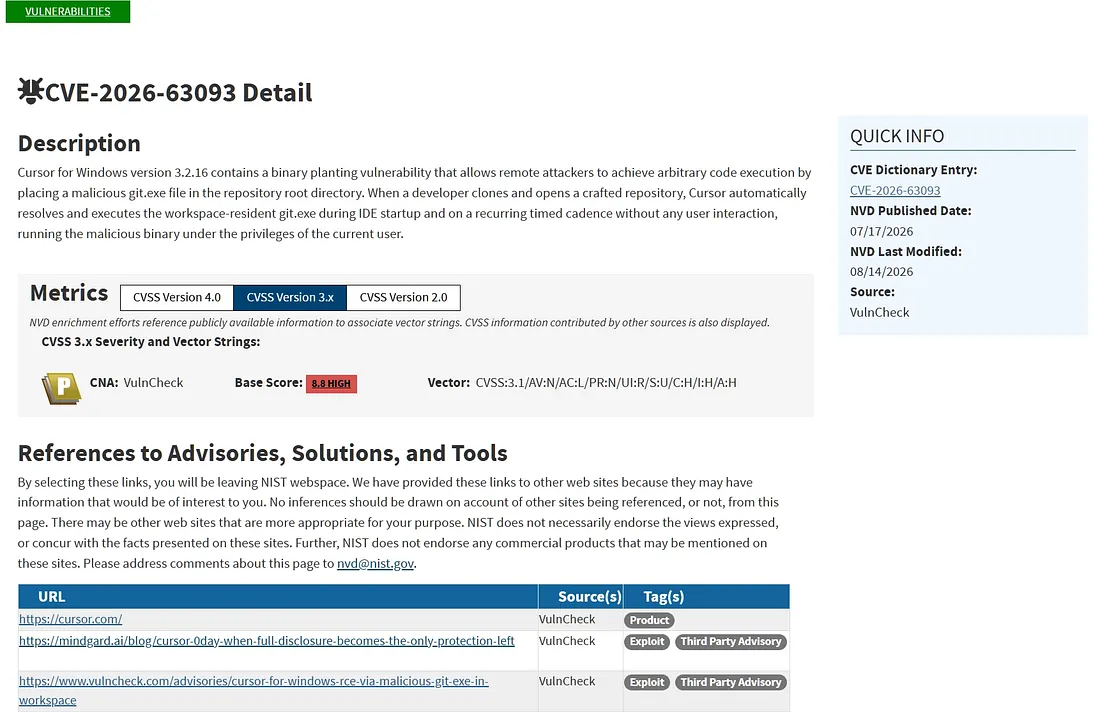
There’s no official acknowledgment that this is a serious security vulnerability. This creates a strange situation and that issue was tracked or assigned CVE-2026-63093, documenting the binary planting issue that could lead to arbitrary code execution through a malicious git.exe placed in the repository root.
A New Path Beyond Git.exe
While the git.exe path was published, our research showed that the issue is not limited to a single binary git.exe file. Under certain conditions, the same user action can also lead to automatic execution through a different path.
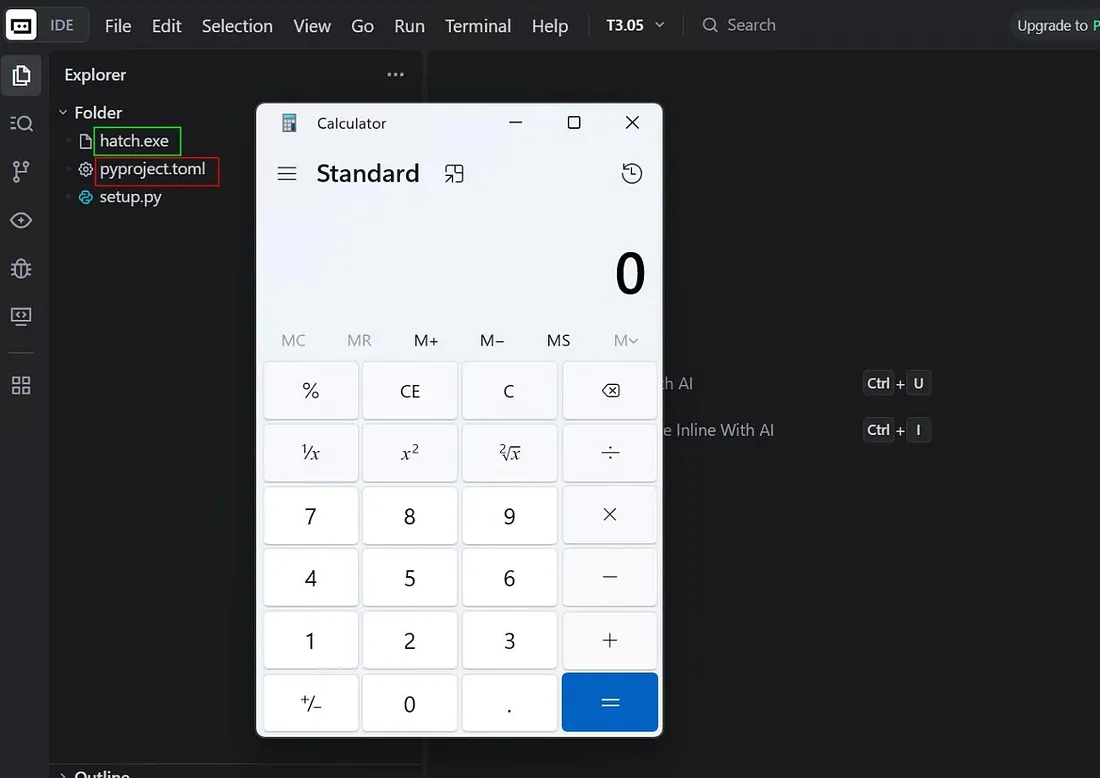
During analysis, we found that Cursor attempts to execute hatch.exe when pyproject.toml is present in the opened repository. If hatch.exe is not found in the current directory, the application invokes CreateProcess to resolve and execute the binary. The process is similar to the git.exe case, but the main difference is the additional trigger file.

The Loader and Payload
The following is the test repository structure, where pyproject.toml acts as the trigger file and the binary hatch.exe serves as the malicious payload. Together, they form the loader-based execution path:
malicious-repository/
│
├── hatch.exe          # target binary
│
└── pyproject.toml     # loader / trigger file
The pyproject.toml file contains:
[build-system]
build-backend = "hatchling.build
The interesting part is that the trigger file itself does not contain an obviously malicious command or script inside. It only contains a simple [build-system] configuration with a build-backend entry. On its own, the file looks like a normal build configuration file rather than a common execution mechanism such as tasks.json which is more likely to be monitored by defenders and may contain explicit execution settings or attributes such as "runOptions": { "runOn": "folderOpen" } and "command".
Demonstrating 0-Click Execution
The following demonstration was one of the techniques featured in my talk in **Red Team Village @ DEF CON 34 (August 6–9, 2026)**, covering the initial access stage of the attack kill chain.

The short proof-of-concept video below shows what happens when a developer or vibe coder opens the repository in Cursor.
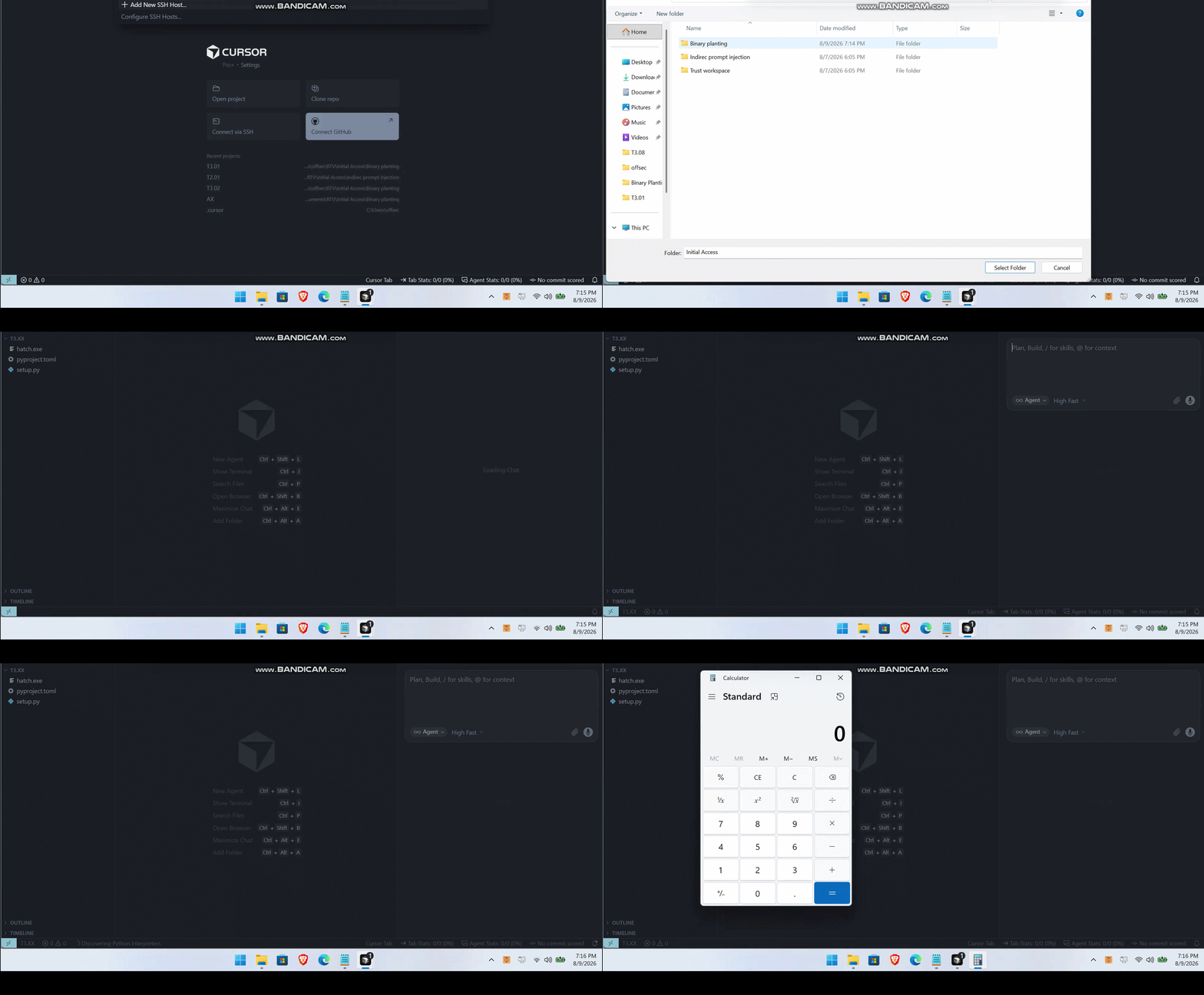
Note: Cursor has Workspace Trust disabled by default. This allows some project features to run without asking the user for approval. This means an attacker can trigger code execution under the user’s permissions simply by having the user open the folder, making this a near-zero-click execution scenario.
"security.workspace.trust.enabled": falseSo, what does ”zero-click” mean here? It means the user only does one simple thing: opens the folder in Cursor. That’s it! No additional clicks, no prompts to approve, no dialogs to confirm just opening folder triggers auto-execution. From user perspective, impact is same: open repo = auto-execute.
Comparison with Other IDEs
This also affects other AI-powered IDEs such as Trae IDE which we used as a sample earlier. However, since Trae enables Workspace Trust by default, this technique still requires the user to click Trust Folder before automatic execution can take place. This introduces an additional user interaction, so the behavior is not considered zero-click like Cursor.
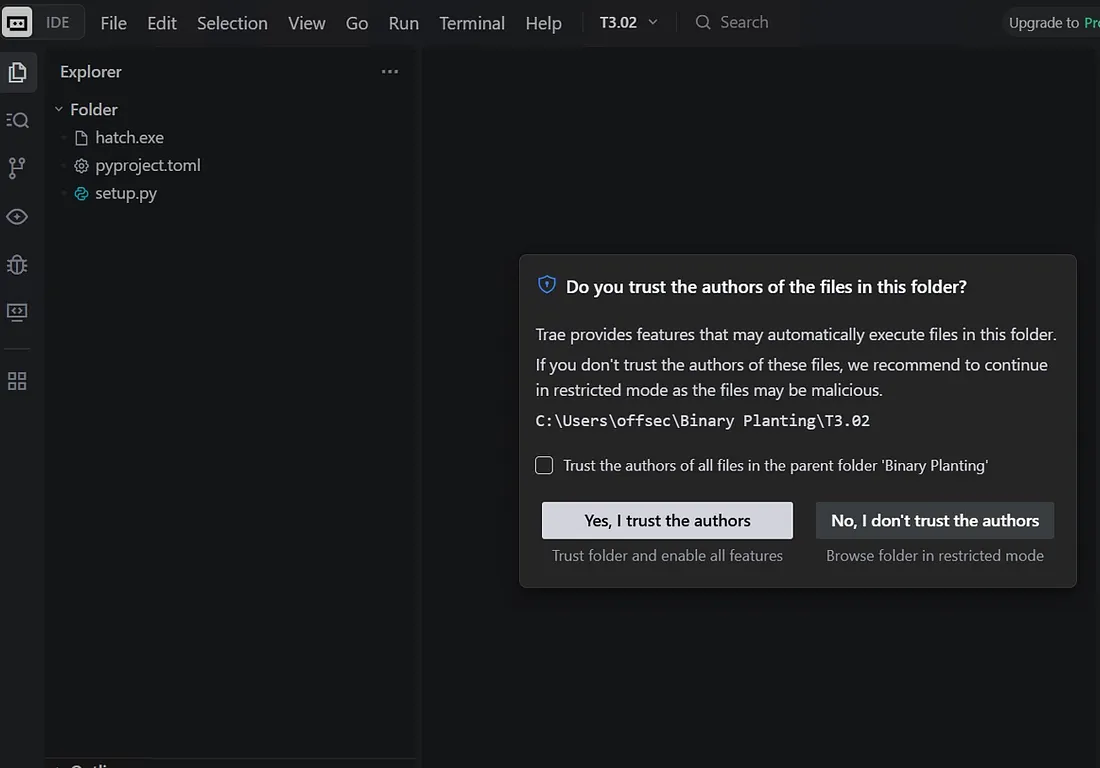
However, the underlying issue remains the same. The malicious repository does not need to contain an obvious tasks.json configuration or directly execute git.exe to trigger the execution path. This makes the behavior harder for developer or users to notice. A malicious repository may look harmless but can still run code when the required conditions are met.
Appendix
Following the publication of this research, the attack path described in this report is reported and no longer reproducible in the latest versions of Cursor. The underlying file-handling and executable discovery behavior has also been addressed, including the attack path demonstrating code execution beyond git.exe.
This disclosure is intended to raise developer awareness that executable files within a project workspace can introduce security risks and that the behavior should not be considered limited to a single file git only.
Developers are still strongly recommended to exercise caution when opening untrusted repositories and ensure that project files are treated as potentially executable content when assessing the security posture of development environments.
Last but not least, please check your favorite IDE for similar issues and see if other executable files in a project can be run unexpectedly, beyond the git.exe issue I shared here. If you enjoyed and found this article helpful, please share it!
References
